lemlist Review 2026: Personalization and Multichannel Done Right
· 22 min read · By Marwene Amor
lemlist built its name on a single idea that turned out to matter: cold email doesn't have to look cold. While most tools raced to send more, faster, lemlist went the other way and made personalization the whole point, dynamic images, custom landing pages, and now a genuine multichannel engine that folds LinkedIn into your email sequences. It's the tool for people who believe relevance beats volume.
Which means it's brilliant for some operators and a poor fit for others, and the honest review has to say which is which. If you sell high-value deals to a focused list, lemlist might be the best tool in this whole category for you. If you're blasting thousands of cold emails and counting cost per inbox, it's probably the wrong choice and I'll tell you so. This review covers what lemlist does better than anyone, where it actually costs you, what it charges, and the exact kind of operator it's built for. And yes, Instantly is the tool we earn from and lemlist isn't, which is precisely why you can trust me when I say lemlist is the better pick for the right person.
Quick verdict: lemlist is the best cold email tool for personalization-led and multichannel outreach, high-value deals, account-based selling, and any motion where each prospect is worth real effort. Dynamic personalization, native LinkedIn steps, and lemwarm make it an actually different animal from the volume senders. Its 2026 push adds Signal Agents (Scout live today, Engage and Optimize Coming Soon), an in-app AI assistant called lemAgent, native inbox placement testing per provider, and a first-party MCP that plugs lemlist into Claude and ChatGPT, a one-click directory connector we verified live on July 28, 2026. If your workflow is drifting AI-native, lemlist is the only tool in this segment shipping that stack in production. The catch is per-seat pricing that gets expensive at scale, and depth you have to actually use to justify. For high-volume, low-touch sending, Instantly is cheaper and simpler.
What lemlist actually is
Let's be precise. lemlist is a cold outreach platform, and the word outreach matters more than email, because lemlist isn't only an email tool anymore. At its core it sends cold email sequences like any sender, but its identity is built on two things the others treat as afterthoughts: deep personalization and multichannel. You can drop a prospect's name onto a mug in an image, generate a personalized landing page for each recipient, and run LinkedIn steps, profile visits, connection requests, messages, in the same sequence as your emails. It also includes lemwarm, its warmup network, to keep deliverability healthy.
It also finds emails now. lemlist ships a native People Database of 650M+ B2B contacts with an AI search layer, the same one we tested in the AI section below, so list building can happen inside the tool. Many operators still feed it verified lists from a dedicated finder like Hunter or Snov.io when verification quality is the priority, then lemlist handles the outreach. Where it sits in the market is the personalization end of the spectrum, the opposite pole from the volume-first tools. That framing matters for the whole review, because lemlist's strengths and its weaknesses both flow directly from that choice. We compare it head-to-head in the three-way lemlist vs Smartlead vs Instantly breakdown and the Instantly vs lemlist vs Apollo comparison.
Pricing: what you're really paying for
lemlist prices per user per month, with tiers that add more as you climb, typically starting around 39 dollars a seat and rising for the plans that add multichannel and higher sending. Treat those numbers as directional and check lemlist's site for the current structure, because the model is the thing to understand, not the exact figure.
Here's the key: lemlist's cost scales with seats and features, not with raw sending volume. That single fact explains everything about who it fits. For a small team doing high-touch outreach, a couple of seats cover the whole operation and the price is very reasonable for what you get. For a high-volume operation running dozens of inboxes, the per-seat model gets expensive fast compared to unlimited-inbox tools, because you're paying for a pricing shape built around people and personalization, not around blasting volume. So the pricing isn't good or bad in the abstract. It's good for depth and bad for volume, which is exactly the shape of the whole tool.
lemlist at a glance
| Dimension | Where lemlist lands |
|---|---|
| Best for | Personalization-led, multichannel, high-value outreach; AI-native operators |
| Entry price | Around $39/seat/mo, rising by features |
| Standout features | Dynamic personalization, native LinkedIn steps, lemwarm, Signal Agents (Scout live), lemAgent AI assistant, native MCP for Claude and ChatGPT |
| Warmup | Included (lemwarm) with 5-bucket landing analytics |
| Inbox placement testing | Native, per provider (Google, Microsoft, SMTP/IMAP), on-demand or scheduled |
| Deliverability alerts | Configurable Warm-up and Outreach alerts with thresholds and notifications |
| AI assistant in-app | lemAgent (full workspace: threads, visual sequence builder, message cards); applying its campaign output needs a paid plan ($109/mo, reconfirmed July 28) |
| AI Context Center | Crawls your website into a structured business context shared by every AI surface (new, July 2026) |
| Signal Agents | Scout live (ICP + activation), agent suggestions priced at 20-100 credits per signal; Engage and Optimize Coming Soon |
| MCP integration | First-party; one-click Claude directory connector (10 tools, verified Jul 28, 2026) or wizard with per-tool Allow / Ask / Block |
| People + Companies database | Included, with a "not already in campaign" filter for clean dedup |
| Main weakness | Expensive at volume; depth needs real use; 2 of 3 Signal Agents still Coming Soon; trial credits gated behind a LinkedIn account link |
| Better for pure scale | Instantly or Smartlead |
Pricing and plans change. Verify on lemlist's site before buying.
The strengths that matter
Let me focus on what lemlist actually does better than the rest, because those strengths are the entire reason to choose it.
Personalization with real depth
This is the flagship, and it's the real thing. lemlist lets you go far past "Hi {first name}." Dynamic text blocks change per prospect. Custom images can drop a company logo or a prospect's name into a visual. Personalized landing pages greet each recipient by name and company. Used well, these make a cold email feel actually one-to-one, which is exactly what cuts through when a buyer has learned to ignore obvious mass mail. The caveat, and it's a real one, is that this power only pays off if you use it thoughtfully. Slapping a name on an image isn't magic; the personalization has to be relevant, which our guide on personalization frameworks gets into. Use it with intent and nothing else in the category matches it.
True multichannel outreach
This is lemlist's sharpest edge in 2026. It doesn't just send email; it orchestrates sequences that blend email with native LinkedIn steps, profile visits, connection requests, and messages, in one automated flow. For reaching senior buyers who live on LinkedIn as much as in their inbox, touching them on both channels in a coordinated way often works far better than email alone. Pure email tools can't do this natively. If your prospects are the kind who ignore a cold email but accept a thoughtful LinkedIn connection, lemlist's ability to combine the two is a genuine competitive advantage, and for many high-value sales motions it's the deciding feature.
Warmup built in with lemwarm
lemlist includes lemwarm, its warmup network, so your deliverability is protected from inside the platform without a separate subscription. It builds and maintains your inbox reputation by exchanging engaged mail with other mailboxes, the same core mechanic as any good warmup tool. It matters as much here as anywhere, because the most beautifully personalized email in the world still fails if it lands in spam. Having warmup native means one less tool to manage, though, as always, you still need a dedicated sending domain and proper authentication for it to do its job, which the deliverability checklist covers.
What lemlist shipped in 2026 that changes the pitch
lemlist spent 2026 shipping AI-native features that stretch the tool from a personalization sender toward something closer to a signal-to-outreach pipeline with a first-class AI surface. Some of that is live and useful today. Some is still on the roadmap. I tested the current state on the trial in July 2026 and here is the operator's view, feature by feature, with a clear line between what ships and what is promised.
Signal Agents: real ambition, one agent live
Signal Agents is the marketing headline for lemlist in 2026. The pitch, which I want to state precisely because it matters, is one system that detects buying signals across roughly twenty signal types (job postings, LinkedIn engagement, funding announcements, and more), turns each signal into an outreach action, and self-optimizes the setup over time. The public numbers lemlist puts on the landing page are +20% reply rate lift, 60 seconds from signal to campaign, and access to a 600M+ contacts pool.
The reality inside the trial is more measured, and I want to be direct about it. Three agents are named in the roadmap: Scout, Engage, and Optimize. Only Scout is live today. Scout scores signal types against your ICP, pre-fills filters and personas, estimates volume and cost upfront, and activates a signal-driven audience in under two minutes. Engage (turning each signal into a multichannel campaign with unique icebreakers per lead) and Optimize (self-tuning the setup weekly) are both flagged Coming Soon inside the product interface. That is not spin; the "Coming soon" badges are visible on the roadmap panel.
What that means for buying is simple. If you pick lemlist today expecting the full three-agent pipeline, you get Scout and a roadmap, and you should discount the pitch accordingly. If you pick lemlist today for its long-standing personalization and multichannel strengths and treat Scout as a bonus that accelerates ICP setup, you are on solid ground. Do not pay for a promise; verify what is shipped when you evaluate. That said, the strategic positioning against pure intent tools (Bombora, 6sense, Cognism) is coherent. Those tools detect signals and stop; lemlist is trying to close the gap between detected signal and sent message inside a single platform. If Engage ships and works, that is a defensible category shift.
Retest, July 21. One week after our first session, the Signal Agents surface had already changed. The landing now leads with a "Launch your Signal Agent" wizard, and launching it requires the AI Context Center (covered below) to be set up first. Once it is, the wizard generated six agent suggestions tailored to our business, each with a "Why this signal?" rationale that was specific and accurate, not template filler. The part I respect most: every suggestion displays its cost before activation, from 20 to 100 credits per signal identified, alongside an estimated signal volume per month. Do that math before you activate anything. One suggested agent priced at 100 credits per signal with roughly 30 signals a month would consume 3,000 credits monthly on its own, while the trial ships with 200 credits total. The pricing transparency is excellent; the affordability at trial scale is not. Treat the trial as a way to see what the agents would do, not to run them.
AI Context Center: the piece that makes the AI layer coherent
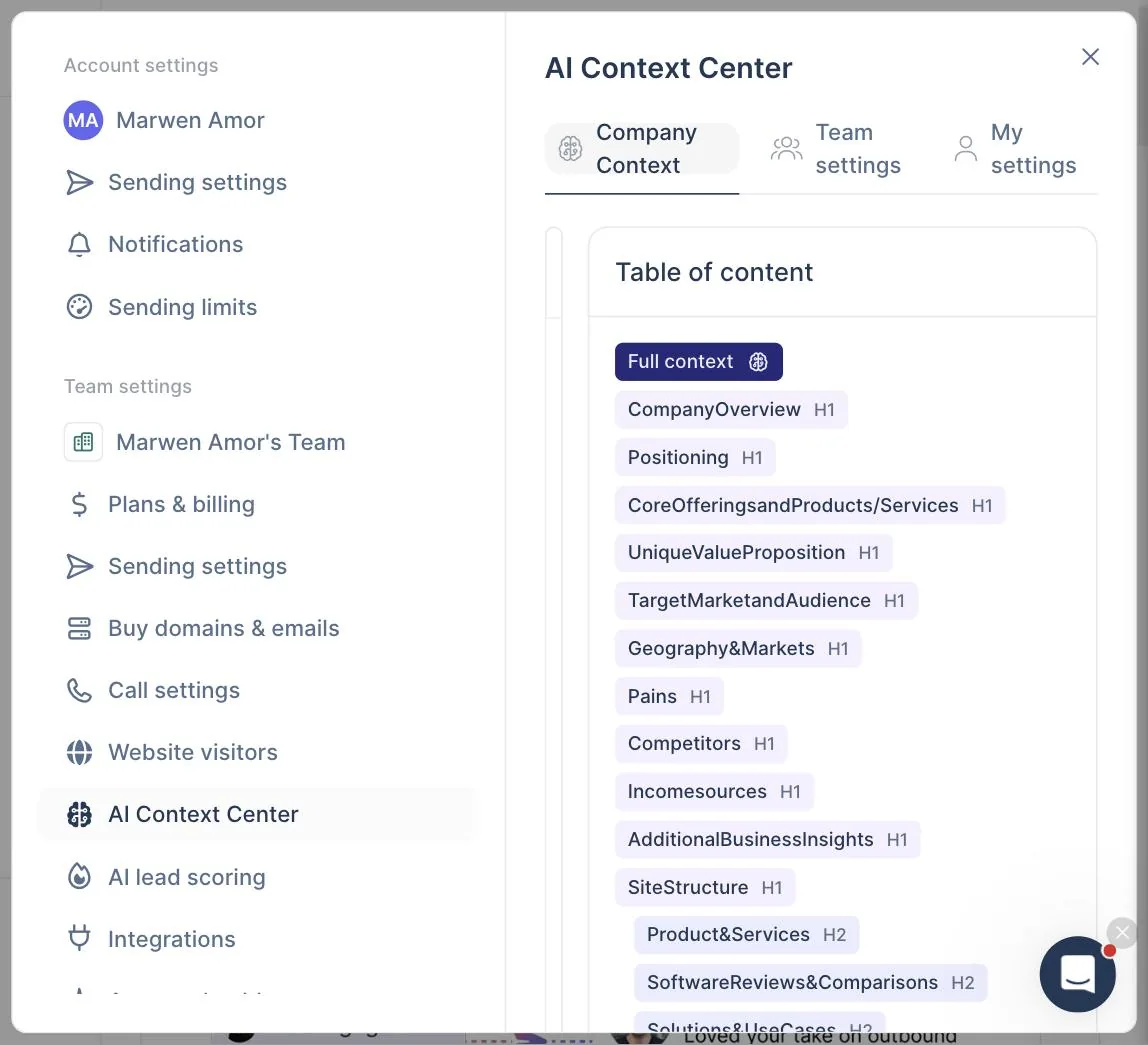
Added between our two test sessions, the AI Context Center (under Settings) is the foundation the rest of the AI layer now stands on. You paste your website URL, and lemlist crawls and analyzes the site to generate a structured business context: company overview, positioning, offerings with prices, unique value proposition, target segments, pains addressed, competitors, income sources, and a full site structure map. That context is then shared across lemAgent, the Signal Agent wizard, and the campaign builder.
I tested it on our own site, and I will be blunt: the accuracy surprised me. It identified our products with exact prices, our positioning phrasing, our audience segments, and even editorial details like the fact that we disclose when we recommend non-affiliate tools. Generation took about thirty seconds. You review the generated document, edit any section, and apply it. This single feature resolves the biggest limitation we flagged in our July 14 session, where lemAgent could only see data inside the account and defaulted to analyzing the signup email's domain. With a context center configured, every AI surface in the product knows what your business actually is.
lemAgent: an in-app AI that reads real account state
lemAgent is lemlist's in-app assistant, a chat pane threaded through the dashboard and, more interestingly, contextualized inside the campaign editor. On the main dashboard it exposes prompt starters like "Check my domain health and deliverability" and "Write compelling cold emails that get replies". Inside a campaign, the starters shift to "Build a multichannel outreach sequence from scratch", "Audit my sequence and suggest improvements", "Write the messages for my steps", and "Complete my sequence with the missing steps". That contextual awareness is the useful part; the assistant knows where you are and what you are trying to do, which cuts the "blank page" friction that plagues most first-time users of a cold email platform.
I gave it one test on the trial: "Check my domain health and deliverability". In roughly ten seconds it returned a structured domain health report with a scored table, an Observations and Recommendations section, and a follow-up question. Because I had not yet connected a sending mailbox, lemAgent used the account email (a personal Gmail) and correctly warned against using that for cold outreach at scale, then offered to help set up dedicated sending infrastructure or connect a mailbox. That is the right answer for a first-time user in exactly that state, and the response beat what I expected from a v1 in-app AI. The tool also auto-titled the thread ("Domain Health and Deliverability") and marked it complete with a green checkmark, both nice touches.
The limitation we flagged in that first session (lemAgent only saw data inside the account, so it analyzed the signup Gmail instead of our real domain) is now fixed by the AI Context Center. In our July 21 retest, lemAgent opened the campaign conversation with our actual business context, by name, and every question it asked was informed by it.
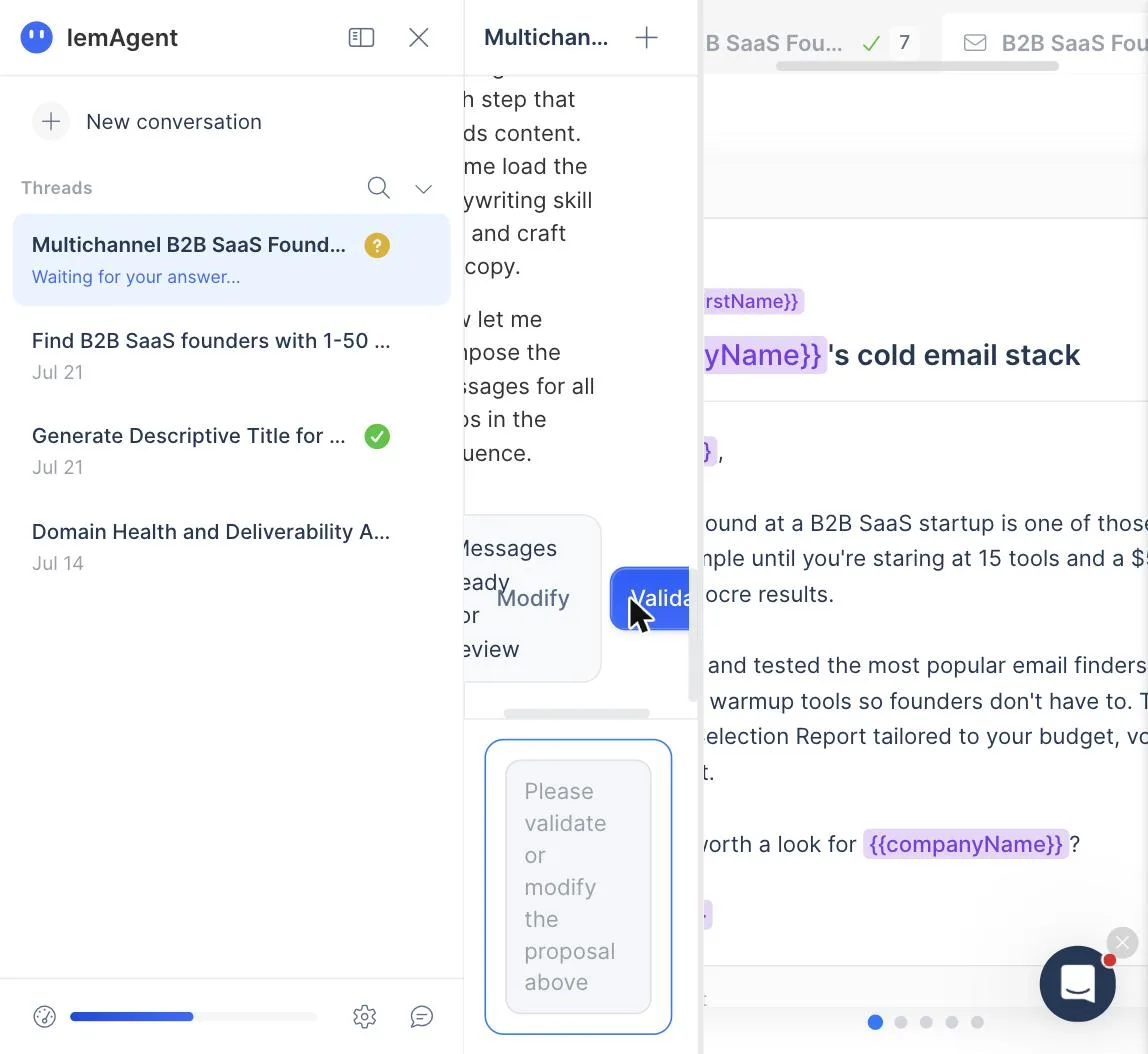
That retest went deep, so here is the full campaign-builder flow as it actually runs. We asked lemAgent to create a multichannel sequence. It ran a structured discovery: campaign goal, audience segment (it listed our real segments, pulled from the context center), company size, pains to address, value proposition (it proposed four angles, all lifted accurately from our site's messaging), the asset to promote (it knew our products and their prices), desired action, channels, and geography. Every question came with clickable suggested answers that were correct for our business. It then produced a campaign strategy document (objective, ICP table, angle, sequence logic with conditional branching on email opens, five touches over eighteen days), a sequence proposal, and finally full message copy for every step, each gated by an explicit Validate step you control. The copy was competent operator-grade cold email, problem-first, short sentences, soft CTA, no cringe.
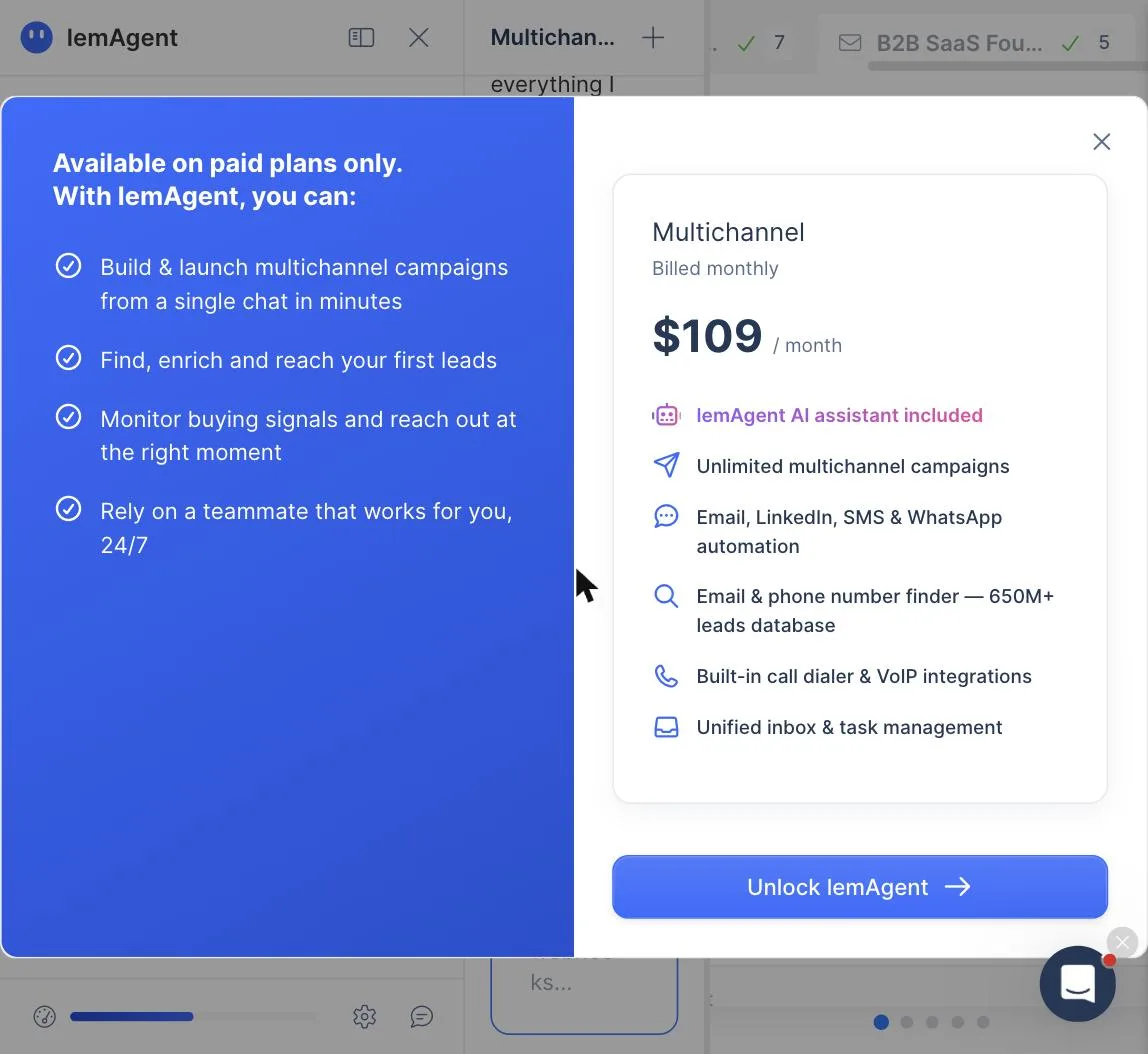
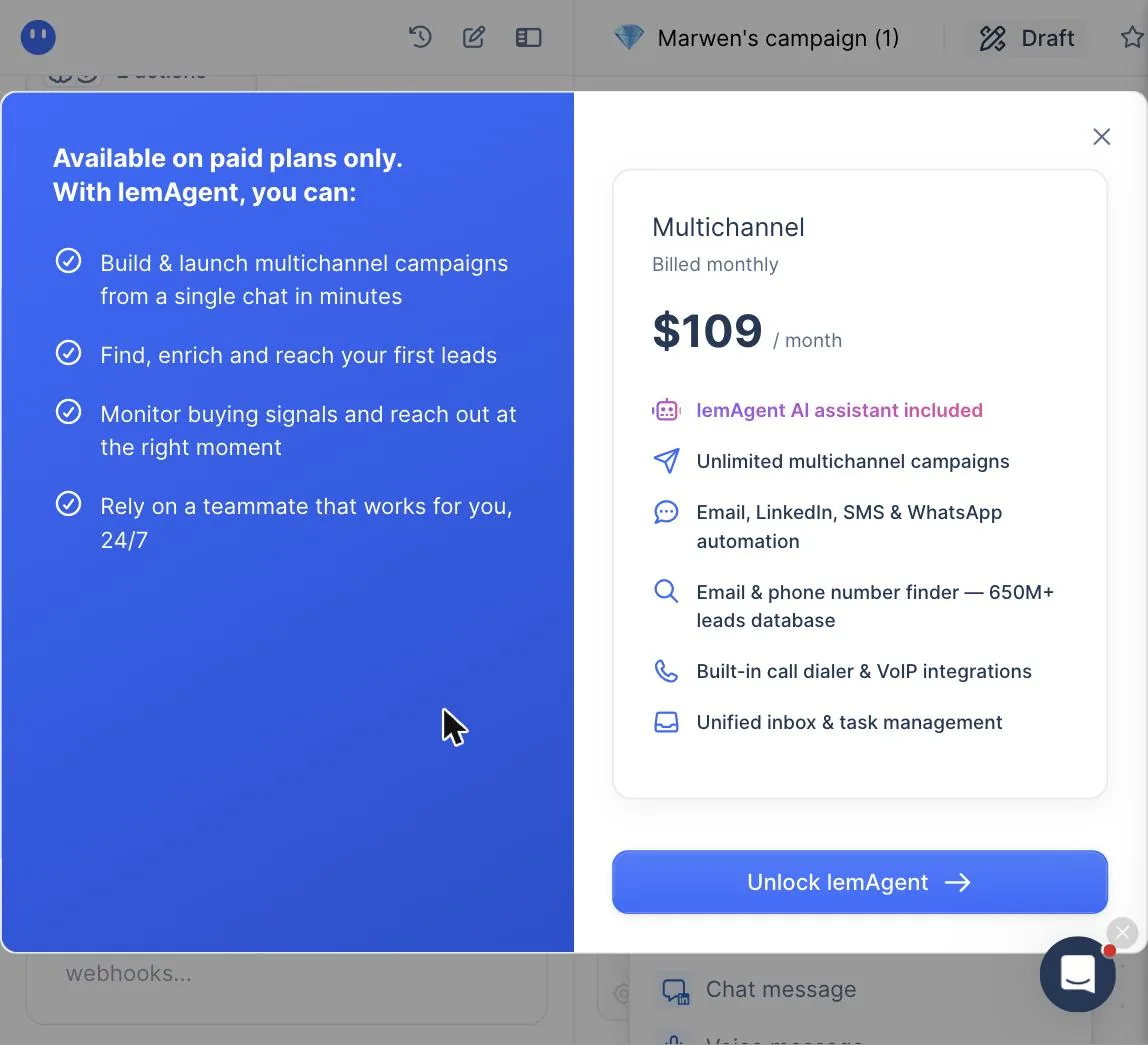
Then the catch. When we validated the messages and asked it to apply everything to the campaign, the flow stopped at a paywall: applying lemAgent's output to a real campaign requires a paid plan, the Multichannel tier at $109 per month in our test. The trial lets you run the entire guided flow and see everything it produces, then gates the last click. As paywall placements go, this one is honest about what you get (you have seen the full output before paying), but know it going in: the trial demonstrates the AI campaign builder, it does not let you use it.
Retested July 28, 2026, and the paywall held. We ran the full flow a third time on an extended trial (34 days remaining, 1,200 credits, both granted through lemlist's partner program) after lemlist's own partner team told us the trial should allow testing lemAgent end to end. The build ran further than ever: lemAgent has grown from a chat pane into a three-panel workspace (threads, conversation, and a live workspace that renders the sequence as a visual flow and the messages as editable cards), and the discovery questions are now skippable, with the agent proceeding from your AI Context Center alone. Sequence proposed, messages written, everything validated. Then the same wall on "create the campaign": "Creating a campaign requires a paid plan." Same Multichannel tier, same $109. If even a partner-extended trial with 1,200 credits cannot ship a lemAgent campaign, treat the paywall as structural, not a bug.
MCP integration for Claude and ChatGPT: one-click connector, per-tool permissions
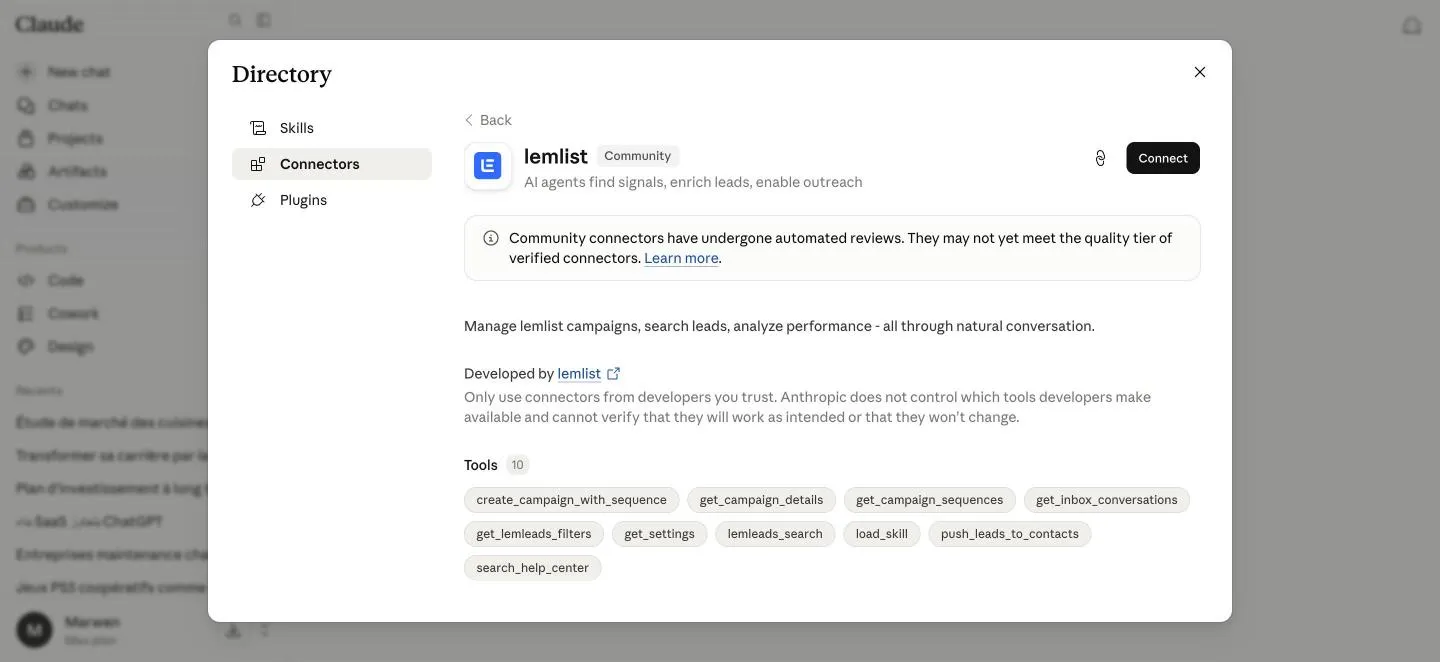
lemlist ships a first-party MCP that connects the app to Claude and ChatGPT without code. Once connected, the assistant calls lemlist tools directly, so prospecting, enrichment and campaign checks happen inside the chat window you already keep open. Instantly and Smartlead ship nothing comparable as of September 2026, and for an operator whose workflow is drifting AI-native, that gap counts for more than any headline feature.
What matters in a review is whether it holds up in use. It does, and the permission model is why: every tool sits at Allow, Ask or Block. Reads run silently, sending asks for confirmation first, deleting is blocked by default.
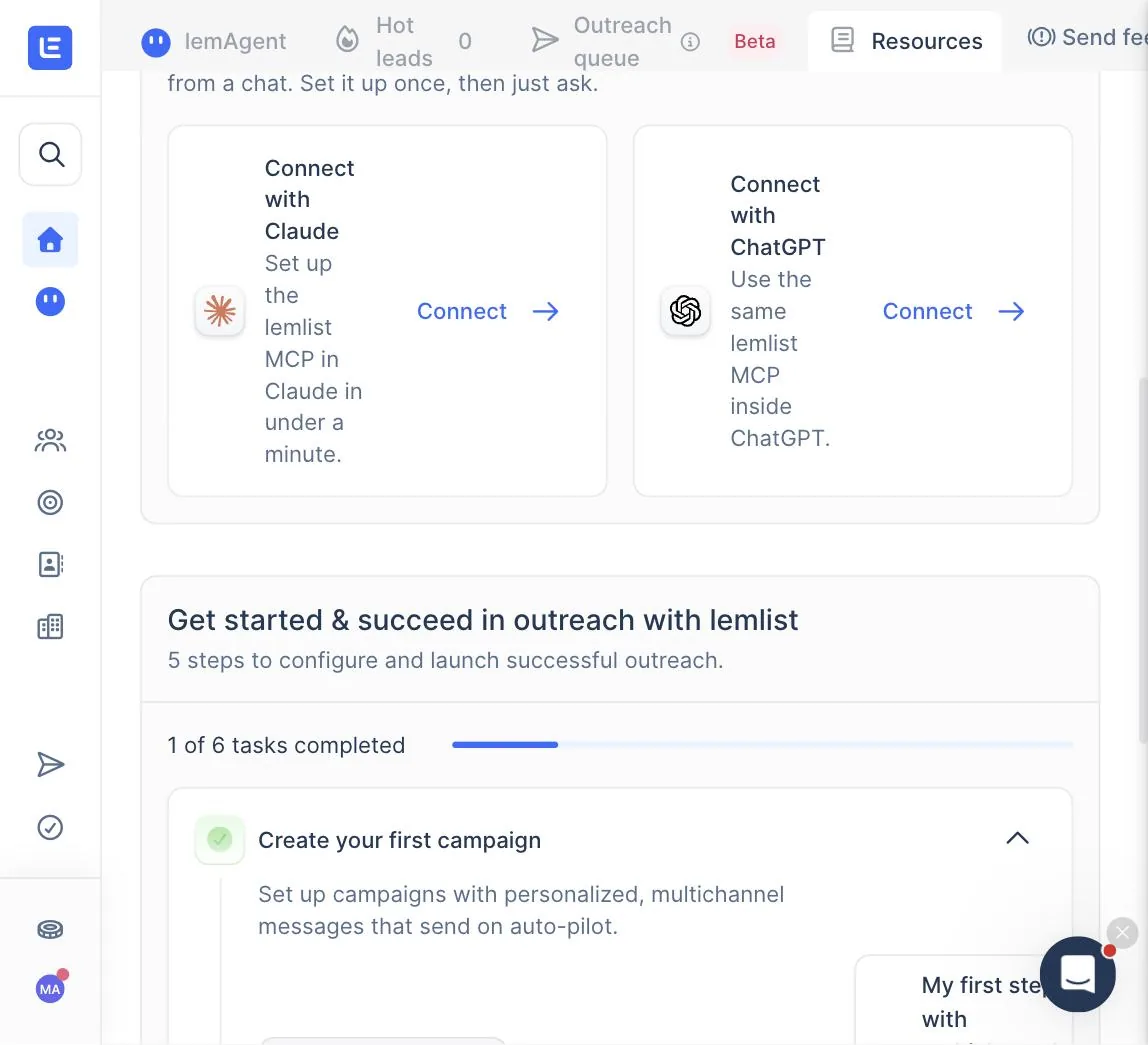
Update, July 28, 2026. The Connect with Claude card now routes to lemlist's listing in Claude's public connector directory, a Community connector that installs in one click with no manual URL step.
The full setup mechanics, the three connection routes, the per-tool permission defaults, what it costs in credits and the one limitation that rules out unattended outreach live on our dedicated page: lemlist MCP with Claude, setup, permissions and what it cannot do.
People database: natural language search that actually builds the filters
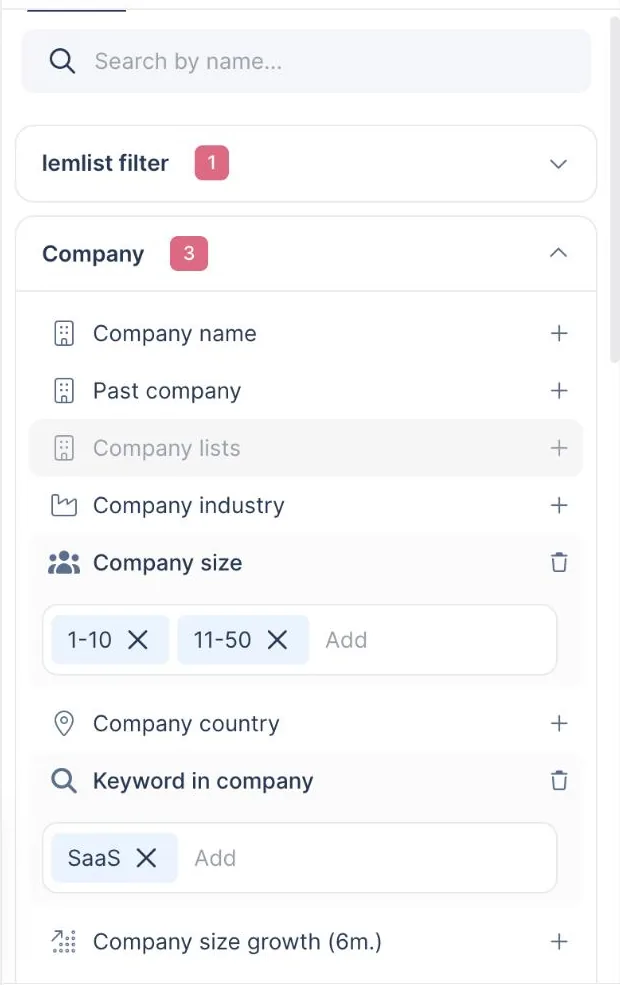
The People database gained an AI search layer between our two sessions, and it changes how the 600M+ contact pool feels to use. Instead of stacking filters by hand, you describe the audience in plain language. We typed "Founders of B2B SaaS startups, 1-50 employees, English speaking" and watched it translate that sentence into concrete filters (company market, two size brackets, a SaaS keyword match, founder and co-founder titles), apply them, verify the audience size, and even correct its own first attempt before settling. Result: 31,583 matching founders, browsable, with the applied filters visible and editable on the left panel, so you can audit exactly what the AI did rather than trusting a black box.
From there the flow is select, then push to contacts or a campaign, with enrichment priced per lead at the moment of push. The current rates, confirmed to us directly by lemlist's partner team on July 24, 2026: finding a verified email costs 5 credits per lead, finding a phone number costs 20. Run that against the 200 trial credits and the ceiling is concrete: 40 verified emails, or 10 phone numbers, before the meter stops. The pricing clarity is the good part. The friction is where the credits come from, which belongs in the weaknesses section below.
Inside the campaign editor: the part of the trial you can actually use
Here is the nuance the paywall coverage above demands. The $109 wall gates lemAgent applying its output. Building a campaign by hand stays open on the trial, and on July 28, 2026 we built one to map exactly what the editor holds. The step catalog runs wider than most buyers assume. Email, chat message, and profile visits sit next to a full LinkedIn block: invitation, chat message, voice message, AI voice message, follow, like last post, comment last post, endorse skill, plus a new withdraw-invitation step. Other channels: SMS (marked New), calls, manual tasks, API calls, send-to-another-campaign handoffs, and a lead-enrichment smart step. WhatsApp chat and voice appear in the catalog but stay gated on the trial. Conditions get their own tab, split between lead data (has email address, has LinkedIn URL, is in your LinkedIn network, lead variable, lead score) and lead behavior (opened email, clicked a link, unsubscribed, booked a meeting, accepted your invite, opened your LinkedIn message). That condition set is what makes the multichannel pitch concrete: "if no email found, go visit the profile instead" is three clicks.
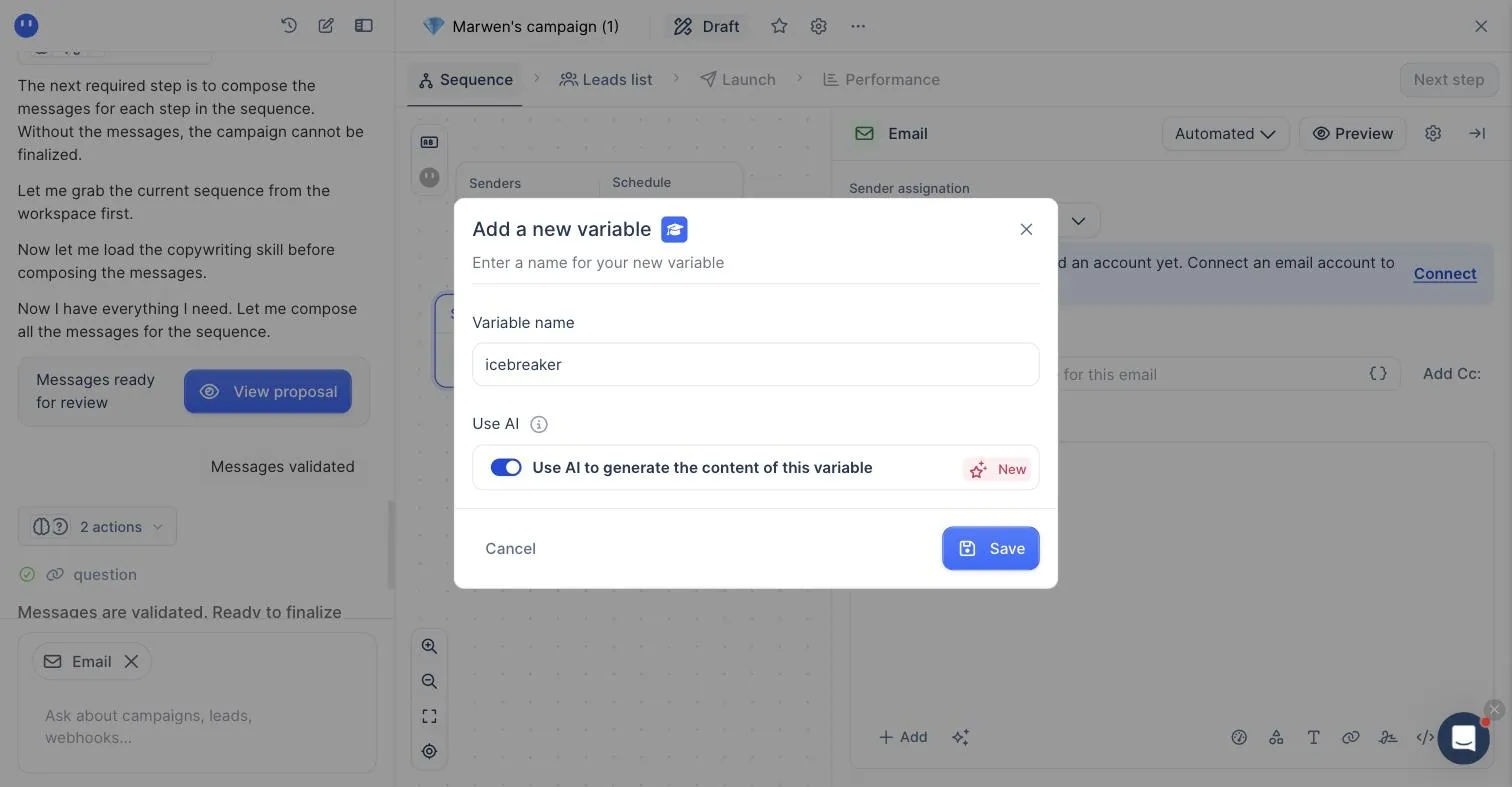
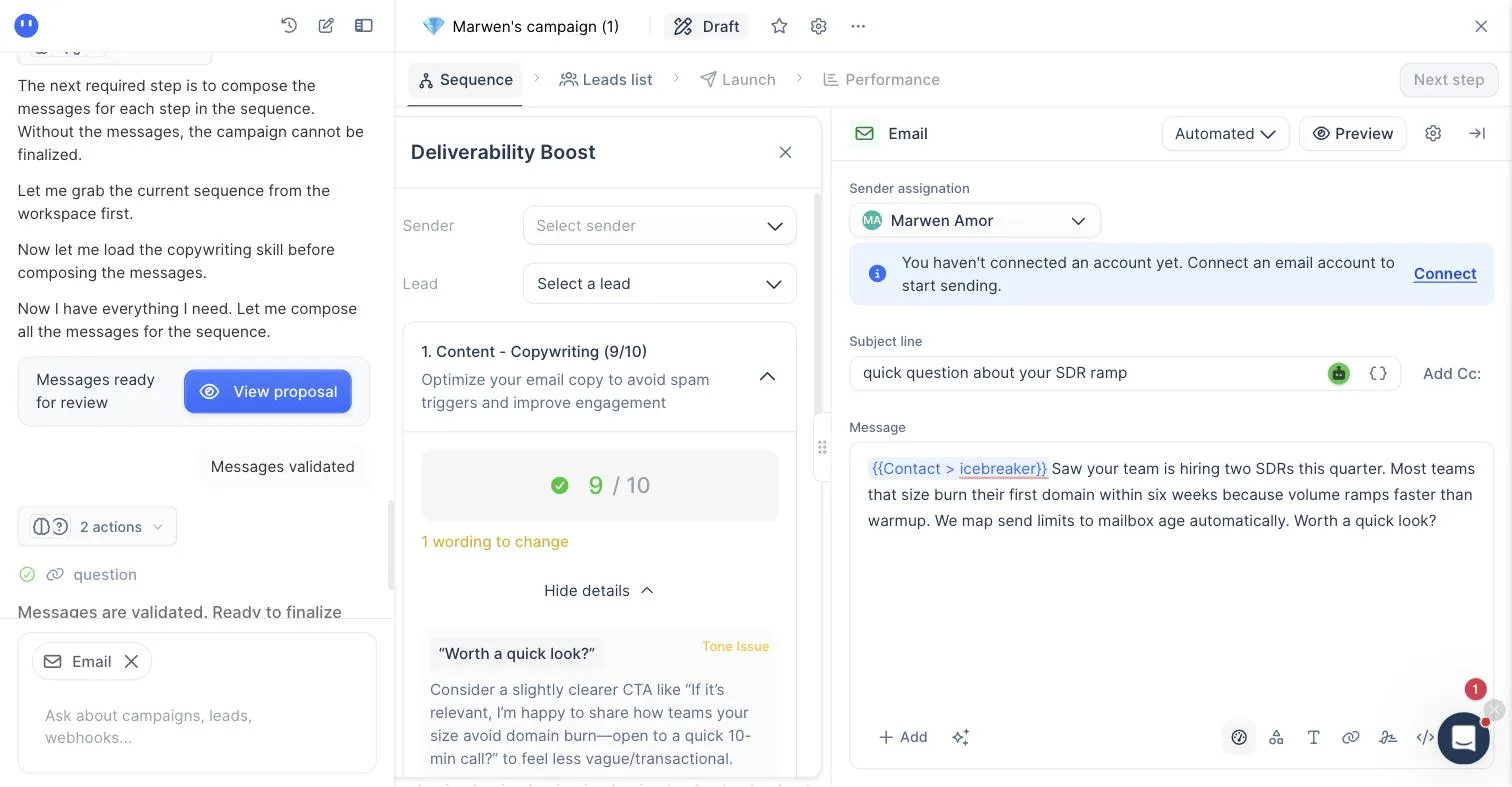
Personalization inside a message goes past merge-tag basics. Typing "/" opens the variable menu with contact and sender fields, and "Create variable" accepts custom fields with an option we did not expect to find open on a trial: a Use AI toggle that generates the variable's content per lead, with the prompt configured from the leads list. We created a custom {{icebreaker}} AI variable in about ten seconds.
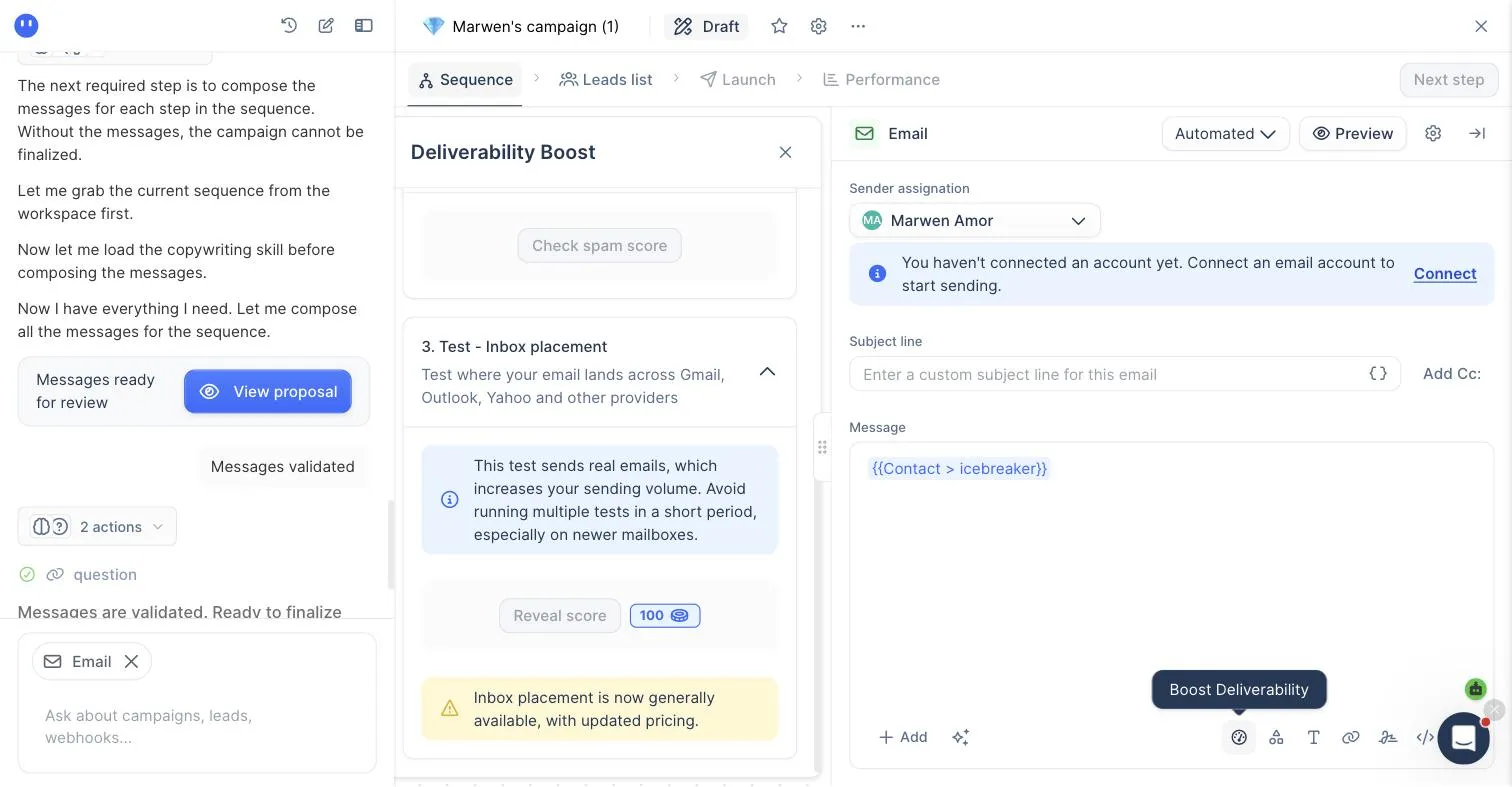
The editor also carries its own deliverability tooling behind a Boost Deliverability icon, in three stages. A copywriting analyzer reads your draft against spam triggers and engagement patterns: it scored our test email 9 out of 10, flagged the exact closing sentence as a tone issue, and proposed a rewrite. Free, instant, no sender required. A content and tech check validates HTML structure, links, authentication and spam score once a sender is connected. And an inbox placement test runs from inside the editor at 100 credits per run, with a plain warning that seed tests send real emails and add to your sending volume, so avoid stacking them on a fresh mailbox.
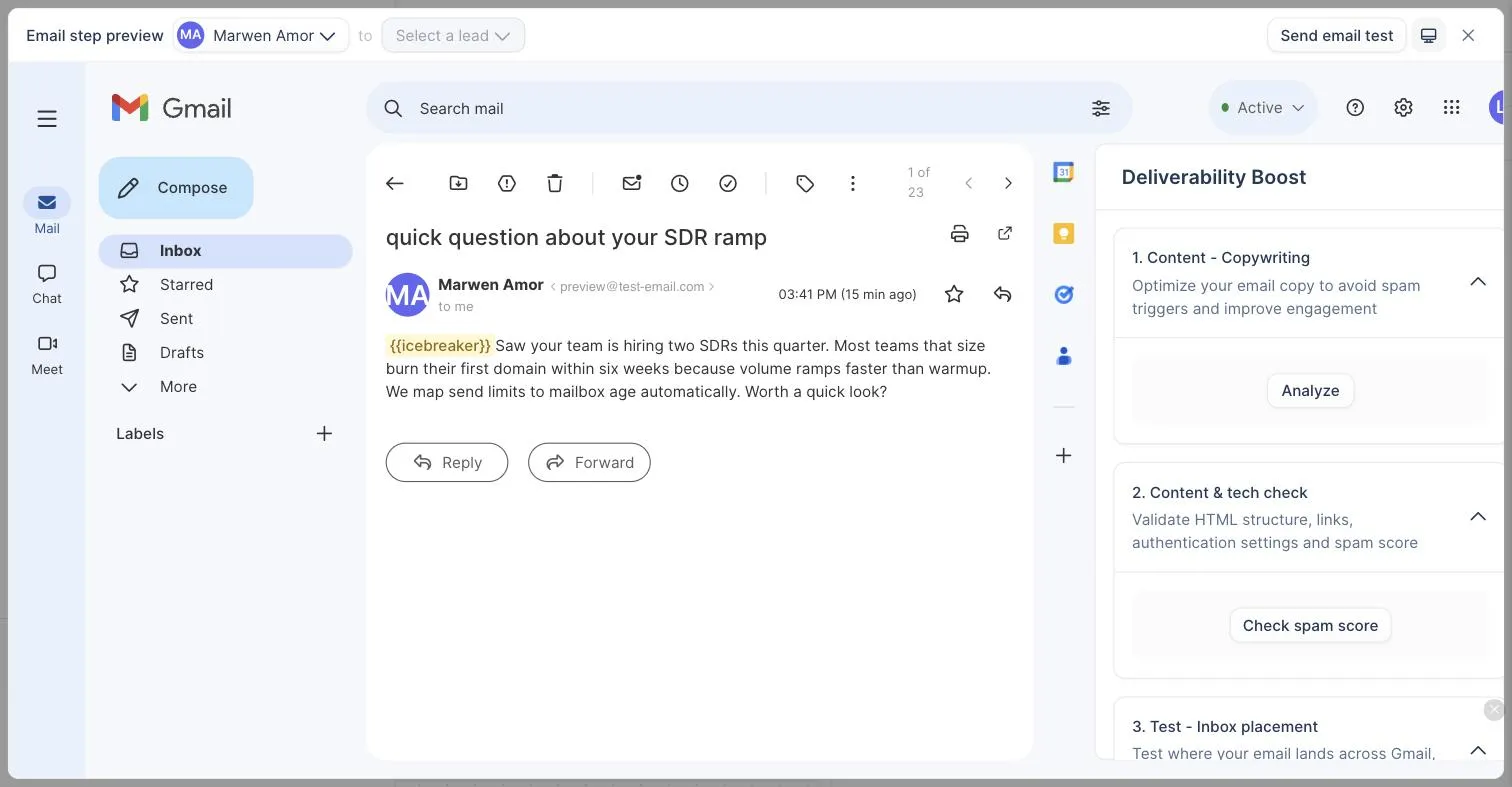
Preview earns a mention because it is the best-executed detail in the editor. It renders your message inside a simulated Gmail inbox, desktop or mobile, unresolved variables highlighted, with a send-test button once a mailbox is connected. You see the exact thing a prospect sees, subject line in the list view included.

The honest summary after three hands-on sessions: the manual editor is fully usable on the trial, the AI campaign builder is watchable, and the difference between the two is the $109 line.
What all of this means together
Signal Agents, the AI Context Center, lemAgent, the People database AI search, and the MCP for Claude and ChatGPT are not five separate features that happen to have shipped in the same year. Read together, they say lemlist has decided to be the AI-native player in cold email, and the Context Center is the piece that makes the rest coherent: one crawled, editable understanding of your business that every AI surface shares. The personalization and multichannel positioning still holds; the new layer sits on top. If none of the AI stuff changes how you actually work, ignore it and evaluate lemlist the old way: pricing, personalization, multichannel, lemwarm. If it does move how you work, lemlist is currently alone in the segment shipping this stack in production, and that is worth a lot when the tool you pick has to keep pace with how you plan to work in twelve months, not just today.
The weaknesses worth knowing before you buy
An honest review names the costs, and lemlist's are specific and predictable. None of them are flaws exactly; they're the natural downside of a tool that chose depth over volume.
It's expensive at volume. The per-seat pricing that's fair for a small high-touch team becomes painful when you want to run many inboxes for high-volume sending. If your motion is scale, you'll pay far more with lemlist than with an unlimited-inbox tool, for features you may not even be using. This is the single biggest reason to pick something else, and it's purely about fit, not quality.
The depth demands effort. lemlist rewards operators who actually craft personalized, multichannel campaigns. If you won't put in that work, and plenty of teams say they will and then don't, you're paying a premium for power that sits idle, and a simpler tool would serve you better and cheaper. Be honest about whether you'll really use the personalization, because that's what justifies the whole thing.
It's not built for pure blasting. If your entire model is sending large volumes of lightly personalized email as efficiently as possible, lemlist is swimming against its own design. It can do volume, but it's not optimized for it the way the scale-first tools are, so you're fighting the tool's grain. Match the tool to your motion and this never becomes a problem.
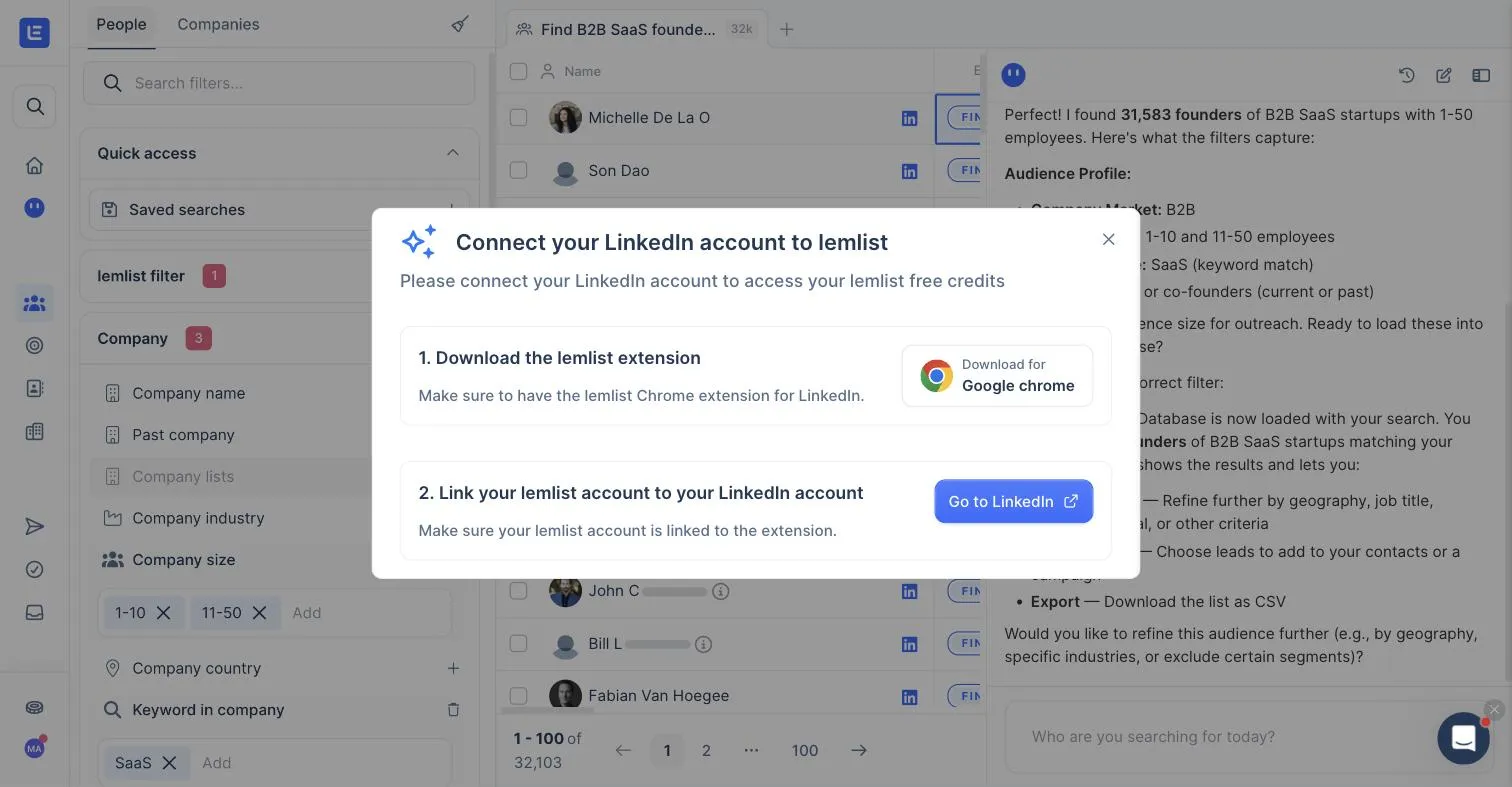
The trial demonstrates more than it delivers. Two gates surfaced in our hands-on testing that you should know before evaluating. First, the 200 free trial credits (the currency for email enrichment and Signal Agents) are locked until you install the lemlist Chrome extension and link your LinkedIn account to it. If you protect your LinkedIn account and refuse to hook it to automation tools, a reasonable stance given LinkedIn's history of restricting accounts tied to automation, you cannot spend a single trial credit. Second, as covered above, lemAgent's campaign builder runs end to end on the trial but applying its output requires the $109/month plan. Neither gate is hidden or dishonest, but the practical result is a trial where the AI stack is watchable rather than usable. Budget your evaluation accordingly. We retested the credits gate on July 28, 2026, on a partner-extended trial: with 1,200 credits sitting in the account, one click on "Find email" in the People database raised the same connect-your-LinkedIn modal. The gate does not scale away with a bigger credit balance.
The honest cross-recommendation: If, reading those weaknesses, you recognized your own motion, high volume, low touch, cost-sensitive, then lemlist isn't your tool, and I'd rather say so than sell you a premium personalization engine you'll use like a basic sender. For that motion, Instantly is where I'd point you, and yes, it's the one we earn a commission on. Pick the tool that fits how you actually sell, not the one with the flashiest features.
Deliverability in practice
Personalization is pointless if the email never arrives, so how does lemlist do on deliverability? Solidly, and the 2026 build has grown teeth here that make the older "lemwarm is included" positioning look understated. The Deliverability suite is now five tabs (Warm-up, Outreach, Inbox placements, Alerts, Settings), and each of them earns the space.
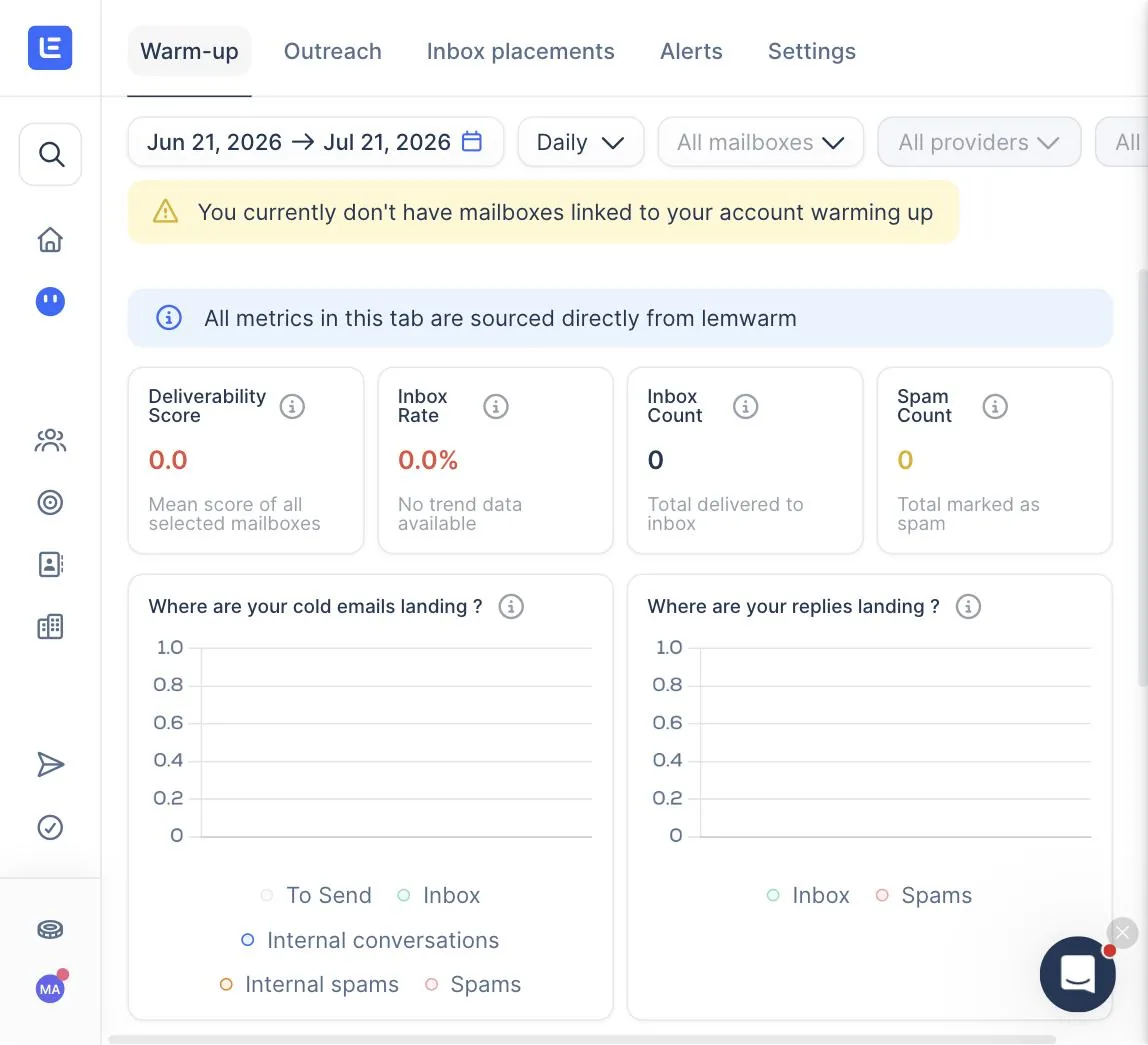
Warm-up is the lemwarm frontage. It shows a Deliverability Score, Inbox Rate, Inbox Count, and Spam Count over your chosen date range, filterable by mailbox, provider, or domain. The two graphs I liked most: "Where are your cold emails landing?" splits into five buckets (To Send / Inbox / Internal conversations / Internal spams / Spams), and "Where are your replies landing?" separates Inbox from Spams. The five-bucket split is more granular than what Instantly exposes, which tends to compress everything into a simple Inbox versus Spam view. If you want to understand exactly where the warmup network is putting your mail versus where real replies are landing, that separation matters.
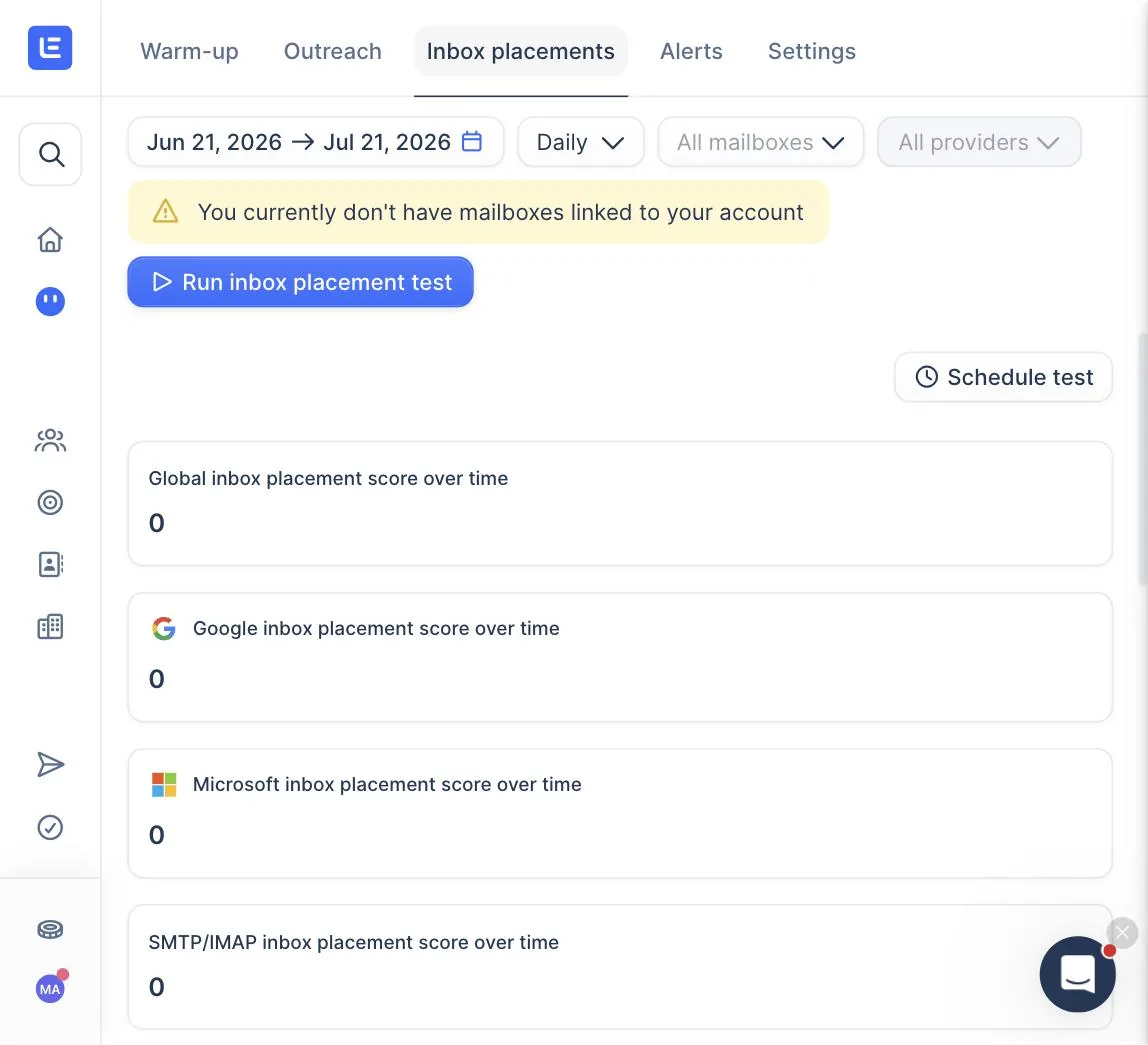
Inbox placements is the section that surprised me most, and it is the reason the 2026 build competes in a category that used to sit outside lemlist entirely. It is a native seed-test suite, on-demand or scheduled, that produces per-provider inbox placement scores: Global, Google, Microsoft, and SMTP/IMAP over time. This is the job that GlockApps and mailReach charge separately for, folded into the platform. If you were paying for one of those on top of Instantly or Smartlead, this line item collapses inside lemlist. The pricing surfaced in our July 28 session: 100 credits per placement run, on demand from the deliverability hub or straight from the campaign editor, with a warning that seed tests send real emails and count toward your volume. At current enrichment rates that is the price of 20 verified emails, a fair trade the week before a real send.
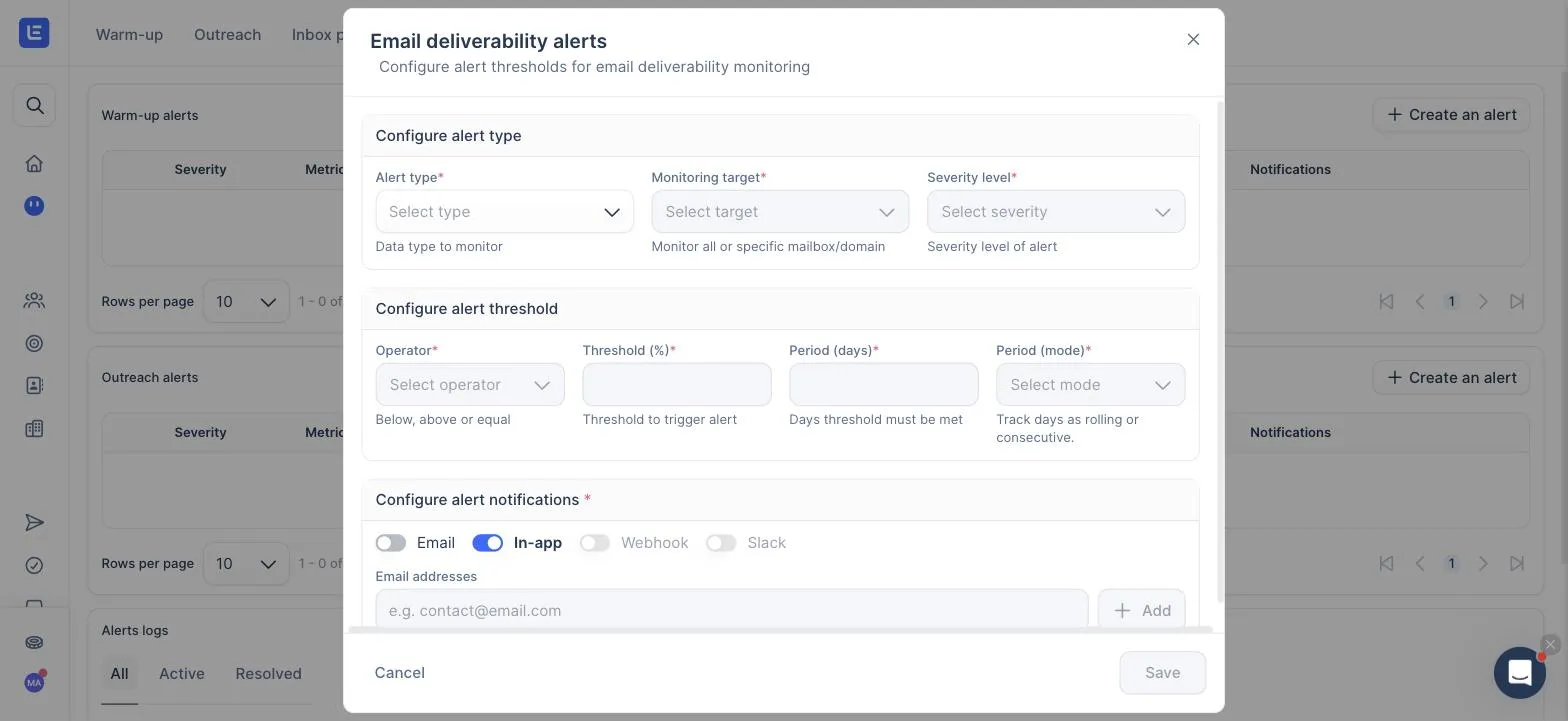
Alerts closes the loop. You can configure Warm-up alerts and Outreach alerts on three metrics (inbox rate, spam rate, deliverability score), scoped to all mailboxes or a specific mailbox or domain, with an operator, a percentage threshold, and a period in days tracked as rolling or consecutive. Notifications go to email, in-app, a webhook, or Slack. There is an alerts log with All / Active / Resolved views. We opened the configuration on July 28 and it is real threshold monitoring, not a toggle: "warn me at warning severity if spam rate crosses 5% for 3 consecutive days on this domain, post it to Slack" is one form. Proactive monitoring done natively stays uncommon in the segment; Instantly has no equivalent shipped as of July 2026.
That said, the universal rule still holds: no tool guarantees the inbox, and lemlist is no exception. You still need the foundation right, a dedicated sending domain, SPF, DKIM, and DMARC authentication, clean verified lists, and sensible volume. lemlist handles warmup, gives you a relevance advantage, and now also gives you per-provider placement visibility and configurable alerts; you handle the setup. Pair it with the sender reputation guide and the SPF, DKIM, and DMARC guide and you are using the stack properly. The personalization is the edge on top of a solid deliverability base, not a substitute for one.
Who lemlist is for
Let me make the recommendation concrete.
Reach for lemlist if you sell high-value deals where each prospect is worth real effort, you run account-based outreach to a focused list, you want to combine email and LinkedIn in coordinated sequences, or relevance and personalization are how you win rather than sheer volume. In all those cases, lemlist is very likely the best tool in the category for you, and its price is more than fair for the results depth-led outreach produces. This is its home turf, and nothing else does it as well.
Try lemlist on the 14-day trial → The manual editor, warmup and placement dashboards shown above are all testable before paying.
Skip lemlist if your model is high-volume, low-touch sending, you're watching cost per inbox at scale, or you won't actually use the personalization and multichannel depth. In those cases Instantly or Smartlead will serve you better and cost you less, because they're built for exactly the motion lemlist isn't. There's no wrong choice here, only a wrong fit, so pick by how you sell.
How lemlist compares to the alternatives
You're choosing between a few tools, so here's the fast positioning against each.
| Versus | lemlist's position | Pick the other one if |
|---|---|---|
| Instantly | Deeper personalization + multichannel; costs more at volume | You send high volume and want the lowest cost per inbox |
| Smartlead | Better for personalization; weaker on API and cost at scale | You're technical or an agency optimizing cost and control |
| Apollo | Better outreach personalization; both ship native databases, Apollo's is the more established | You want a database-first tool with sending attached |
| Woodpecker | Stronger multichannel; less agency-native workspaces | You run an agency wanting per-client workspaces |
The pattern is clear once you see it. lemlist wins whenever the job is relevance, personalization, and multichannel. It loses whenever the job is raw volume at the lowest cost. That's a sharp, coherent identity, and it's why the tool is beloved by the operators it fits and quietly abandoned by the ones it doesn't. Know which you are before you buy.
Taken two at a time, the pairings people search for most are lemlist vs Instantly, which comes down to whether your problem is reach or relevance, and lemlist vs Smartlead, where the two tools barely compete at all. If the question is data rather than sending, the matchup you want is Apollo vs lemlist.
Getting started: the first week
A quick note on expectations, because lemlist rewards a deliberate start. Connect your sending inboxes on dedicated domains, not your main one, switch on lemwarm, and let it run. Don't launch cold campaigns on day one. Use that warmup window to get your authentication right and build a verified, tightly segmented list, because lemlist's personalization only shines when your segments are sharp enough to say something specific to each.
Then build your first sequence with intent. This is where lemlist is different from a volume tool: the setup is more involved because you're crafting personalization and possibly multichannel steps, and that's the point. Budget more time for campaign creation than you would with a blast tool, and treat that time as the work that makes the tool worth its price. Rush it and you get an expensive basic sender. Invest in it and you get the one-to-one outreach lemlist was built to deliver. The warmup playbook covers the deliverability side of that first week.
A worked example: where lemlist earns its price
Abstract "it's good for high-value deals" is easy to nod at and hard to picture, so here's a concrete one. Say you sell a $40,000-a-year platform, and your entire realistic market is three hundred companies. That's the shape where lemlist stops being expensive and starts being cheap.
With three hundred targets, volume is irrelevant. You're never sending five thousand emails. You're touching a small list, and each touch is worth a fortune, so effort per prospect is the right investment, not a waste. That's lemlist's home. You research each account, write an actually personalized opener, drop in a custom visual that references their business, and pair the email with a LinkedIn connection and a follow-up message, all in one orchestrated sequence. One closed deal pays for the tool many times over for a year. The per-seat price that would be painful across forty inboxes is a rounding error here, because you need two seats, not forty. And the personalization depth that a volume sender can't match is exactly what gets a skeptical VP to reply. This is the motion lemlist was designed for, and in it, nothing else competes. Flip the example to a $50-a-month product sold to thousands, and the whole thing inverts: now the personalization is unaffordable per prospect and the per-seat cost is a burden, which is precisely why that operator should be on a volume tool instead. Same tool, opposite verdict, entirely because of the deal size and list size. That's the lens for the whole decision.
Switching to lemlist from another tool
A lot of lemlist's users arrive from a volume tool, usually because they moved upmarket and personalization suddenly started to matter. If that's you, one caution on the migration, because it has a deliverability catch like any platform switch.
Your inboxes carry their reputation with them, but the switch itself is a change, and change deserves care. Move your inboxes over, keep lemwarm running, and re-ramp your volume rather than picking up exactly where you left off. Give it a short re-warm window. It's a few days of patience against weeks of potential damage. The bigger shift, though, is in how you work, not the tooling. Moving to lemlist only pays off if you actually change your motion to use its depth. Bring your old spray-and-pray habits to lemlist and you've just bought a more expensive version of the tool you left, with none of the benefit. So treat the switch as a moment to rebuild your process around relevance: tighter segments, real research, personalized sequences, multichannel where it fits. Re-verify your lists on the way in, because a list that was clean months ago has decayed, and prune the dead weight. Done that way, the switch is worth it. Done as a straight tool swap with the same old habits, it's just a higher bill. The tool is only as good as the motion you run through it.
Frequently asked questions
What is lemlist used for?
lemlist is a cold outreach platform built around personalization and multichannel sequences. Beyond sending email, it lets you insert dynamic text, custom images, and personalized landing pages, and mix email with native LinkedIn steps in one campaign. It includes lemwarm for warmup. It's designed for relevant, one-to-one outreach rather than pure high-volume blasting, so it suits high-value sales. It also ships a native People Database of 650M+ B2B contacts with AI search, so you can build lists inside the tool or import your own from a dedicated finder.
How much does lemlist cost?
lemlist is priced per user per month, typically starting around 39 dollars a seat and rising for advanced plans that add multichannel and higher sending. The per-seat model is why it's expensive for high-volume teams running many inboxes, and economical for a small team doing high-touch outreach. Verify current pricing on lemlist's site, but the key point is that cost scales with seats and features, not raw sending volume.
Is lemlist better than Instantly?
They're built for different jobs. lemlist wins on personalization depth and multichannel, so it's better for high-value, low-volume campaigns where relevance drives the result. Instantly wins on scale and cost, so it's better for sending large amounts of cold email efficiently. If each prospect is worth real money and effort, lean lemlist; if you're sending at volume and watching cost per inbox, lean Instantly.
Does lemlist include email warmup?
Yes. lemlist includes lemwarm, its built-in warmup network, which builds and maintains your sending reputation by exchanging engaged email with other mailboxes. Warmup matters as much for lemlist as any sender, because even the most personalized email fails if it lands in spam. Having warmup native means no separate subscription, though you still need a dedicated sending domain and proper SPF, DKIM, and DMARC authentication.
Is lemlist good for LinkedIn outreach?
Yes, multichannel is one of its main strengths. It lets you build sequences combining email steps with native LinkedIn actions like profile visits, connection requests, and messages, all in one campaign. For selling to senior buyers who live on LinkedIn, that combined approach often beats email alone. It's a real differentiator against pure email senders and a big part of why lemlist suits account-based and high-value outreach.
What are the downsides of lemlist?
The main one is cost at volume: the per-seat pricing makes it expensive if you run many inboxes for high-volume sending. Its deep personalization also takes time to use well, so if you won't craft personalized campaigns, you're paying for power you don't use. And it's less optimized for pure blasting than tools built around unlimited inboxes. For a high-volume, low-touch operation, Instantly or Smartlead make more sense. On the newer AI stack, be aware that two of the three Signal Agents (Engage and Optimize) are still Coming Soon as of July 2026, so if you are buying for that specific pitch, discount accordingly.
Can I connect lemlist to Claude or ChatGPT?
Yes. lemlist ships a first-party MCP for Claude and ChatGPT, installable in one click as a Community connector from the Claude directory, with a no-code wizard as the alternative route. Each tool carries an Allow, Ask or Block permission: reads run silently, sends ask for confirmation, deletes are blocked. Instantly and Smartlead have shipped no equivalent. The full setup, the permission defaults and the limits are on our dedicated lemlist MCP page.
What are Signal Agents in lemlist and are they usable today?
Signal Agents is lemlist's 2026 AI feature that turns buying signals (job posts, LinkedIn engagement, funding, and around twenty other signal types) into outreach actions. Three agents are named in the roadmap: Scout, Engage, and Optimize. Only Scout is live today. Scout scores signal types against your ICP, pre-fills filters and personas, estimates volume and cost, and activates a signal-driven audience in under two minutes. Engage (multichannel campaigns per signal) and Optimize (self-tuning setup) are both flagged Coming Soon inside the product. If you buy lemlist today for the full Signal Agents pitch, you get Scout and a roadmap; if you buy lemlist for its personalization and multichannel strengths and treat Scout as a bonus, you are on solid ground.
What does the lemlist free trial actually include?
The 14-day trial shows you everything and lets you use some of it. You can explore the full product, build campaigns manually, generate an AI Context Center from your website, run lemAgent's complete campaign-builder flow (discovery, strategy, sequence, message copy), and browse the People database with its AI search. Two gates apply: the 200 free credits for enrichment and Signal Agents become available only after you install the lemlist Chrome extension and link your LinkedIn account, and applying lemAgent's campaign output to a real campaign requires a paid plan (the Multichannel tier at $109/month, reconfirmed July 28, 2026 on an extended partner trial with 1,200 credits). The manual campaign editor is a different story: it stays fully usable, including the step and condition catalogs, custom AI variables, the copywriting analyzer, and the Gmail-simulated preview. Plan your evaluation around building by hand and watching the AI stack work rather than shipping with it.
Does lemlist do inbox placement testing without a separate tool like GlockApps?
Yes, since 2026. The Deliverability suite has a native Inbox placements tab with on-demand or scheduled tests, and results split per provider (Global / Google / Microsoft / SMTP-IMAP) over time. If you were paying for GlockApps or mailReach on top of a cold email tool, that line item collapses inside lemlist. It also has a configurable Alerts tab (Warm-up and Outreach alerts with thresholds and notifications) that Instantly does not ship as of the same date.
Bottom line
lemlist is the best tool in cold email for the operators who believe relevance beats volume, and it backs that belief with actually differentiated personalization, true multichannel sequences, built-in warmup, native per-provider inbox placement testing, and configurable deliverability alerts. On top of that, its 2026 AI layer (Signal Agents with Scout live, lemAgent inside the app, and a first-party MCP connector for Claude and ChatGPT) is a real bet, and it puts lemlist alone in the segment shipping this stack in production today. If you sell high-value deals, run account-based outreach, compete on being relevant rather than loud, or your workflow is drifting AI-native, it is very likely your tool and worth every dollar of its per-seat price. If your motion is high-volume, low-touch sending, it is the wrong fit, and Instantly is where I'd send you instead. For the record, we now earn from both tools (lemlist joined our affiliate partners in July 2026, after this review was written), so the recommendation carries no financial thumb on the scale in either direction. Pick for how you actually sell, and lemlist will either be the sharpest tool you've used or an expensive mismatch, entirely depending on which operator you are.
Visit lemlist → Compare it first →
For the head-to-heads, see lemlist vs Smartlead vs Instantly and Instantly vs lemlist vs Apollo; for the wider field, the best cold email software guide.

About the author
Marwene Amor · Founder @ EmailToolsHub
I review B2B cold email tools as an independent operator, testing the products myself and writing the honest version of what I find. More about me or connect on LinkedIn.
Related Reviews & Guides
Other deep dives on EmailToolsHub that pair well with this one.
lemlist vs Smartlead vs Instantly
Personalization vs budget-scale vs polished scale, with a clear pick for each motion.
Read it →Personalization Frameworks
How to make the personalization lemlist enables actually land, PASO, PAS, and more.
Read it →Instantly Review 2026
The scale-first alternative for high-volume, cost-sensitive sending.
Read it →