Free PDF · Real sample · No fluff

18 Verified B2B SaaS Decision-Makers, Built With Hunter

A real B2B lead list, not a mock. 18 named decision-makers across 7 SaaS sales-tech companies (lemlist, Snov.io, Close, Woodpecker, Lusha, Salesflare, Reply.io). Sourced from LinkedIn, verified with Hunter.io. Emails masked for privacy in the public sample. This is what a properly built list actually looks like before it lands in your sequencer.

  • 18 named decision-makers with title, company, industry, and verified email status
  • ICP: B2B SaaS sales-tech, reachable companies (not mega-corps)
  • Executive, IT, Sales, Marketing, and Product roles
  • Catch-all domains flagged so you know what needs re-confirmation
  • Built with Hunter Domain Search and Verifier

Download the sample list

Public PDF. Two pages. Emails masked. Grab it, open it in ten seconds, decide if the methodology fits your outbound workflow.

Download the sample PDF →

No email gate on this one. If you want the full methodology and the tracker template too, they live at the bottom of this page.

Preview · Sample rows

What lands in your sheet

Contact · Role Status
Charles T. · CEO, lemlist Catch-all
Maël E. · CPO, lemlist Catch-all
Lieven J. · Co-Founder, Salesflare Verified
Anatol K. · VP Product, Reply.io Verified
Denys K. · Head of Product, Snov Verified
Steli E. · CEO, Close Catch-all
Lior H. · Chief Delivery Officer, Lusha Catch-all
+ 11 more decision-makers in the PDF

Sourced through Hunter.io Domain Search. Structured as CSV-ready columns.

EmailToolsHub · emailtoolshub.com

What's inside the PDF

The whole table fits on one page. Here's the shape of it.

Company Industry Sample contact Verified
lemlistB2B SaaS · OutreachCEO, CPO, VP Growth, Growth ManagerCatch-all (flagged)
SalesflareCRM SoftwareCo-FounderDirect
Reply.ioSales Engagement SaaSVP of ProductDirect
WoodpeckerEmail / Sales AutomationCMO, Director of Product Marketing, Sales ManagerCatch-all (flagged)
Snov.ioB2B Lead-Gen SaaSHead of Product, 2× Revenue ManagersDirect
CloseCRM SoftwareCEO, VP Product & Engineering, VP EngineeringCatch-all (flagged)
LushaSales IntelligenceChief Delivery Officer, Director of Product Management, Senior RevOps ManagerCatch-all (flagged)

Emails are masked in the sample. In a full delivery they land verified, complete, and ready to import.

Download the sample PDF →

How this list was built (the real methodology)

Every step below is reproducible. If you use the same tools, you'll get the same quality. Most lead lists on the market skip half of these steps and it shows in the bounce rate.

1

Lock the ICP first

Industry, job titles, company size, geography, exclusions. Get this right and the whole list improves. Skip it and every step downstream compounds the noise.

2

Find named decision-makers

Target accounts and named people pulled from LinkedIn and Hunter's Domain Search. No generic info@ addresses, no shared inboxes. Real humans with titles that match the buying committee.

3

Verify every email

Hunter's verifier runs on every address. Only "verified" or "verified (catch-all)" passes. Catch-all domains are flagged in amber so the sender knows what needs re-confirmation before send.

4

Structured delivery

Clean sheet with name, title, company, website, verified email, source, notes. Drops straight into any CRM or sequencer. No cleanup required on the buyer side.

5

Follow-up tracker included

A color-coded tracker so no lead gets lost between "sent" and "meeting booked". Six statuses covering the full inbound reply flow.

6

Async, written updates

Written progress notes as the list is built, quality flags along the way, and targeting adjustments based on what replies. Nothing gets lost in Slack pings or DM threads.

Hunter in action: the workflow behind the sample

Four screenshots. Domain Search on two target companies, then verifier calls on individual addresses. This is exactly the flow that produced the 18-lead sample.
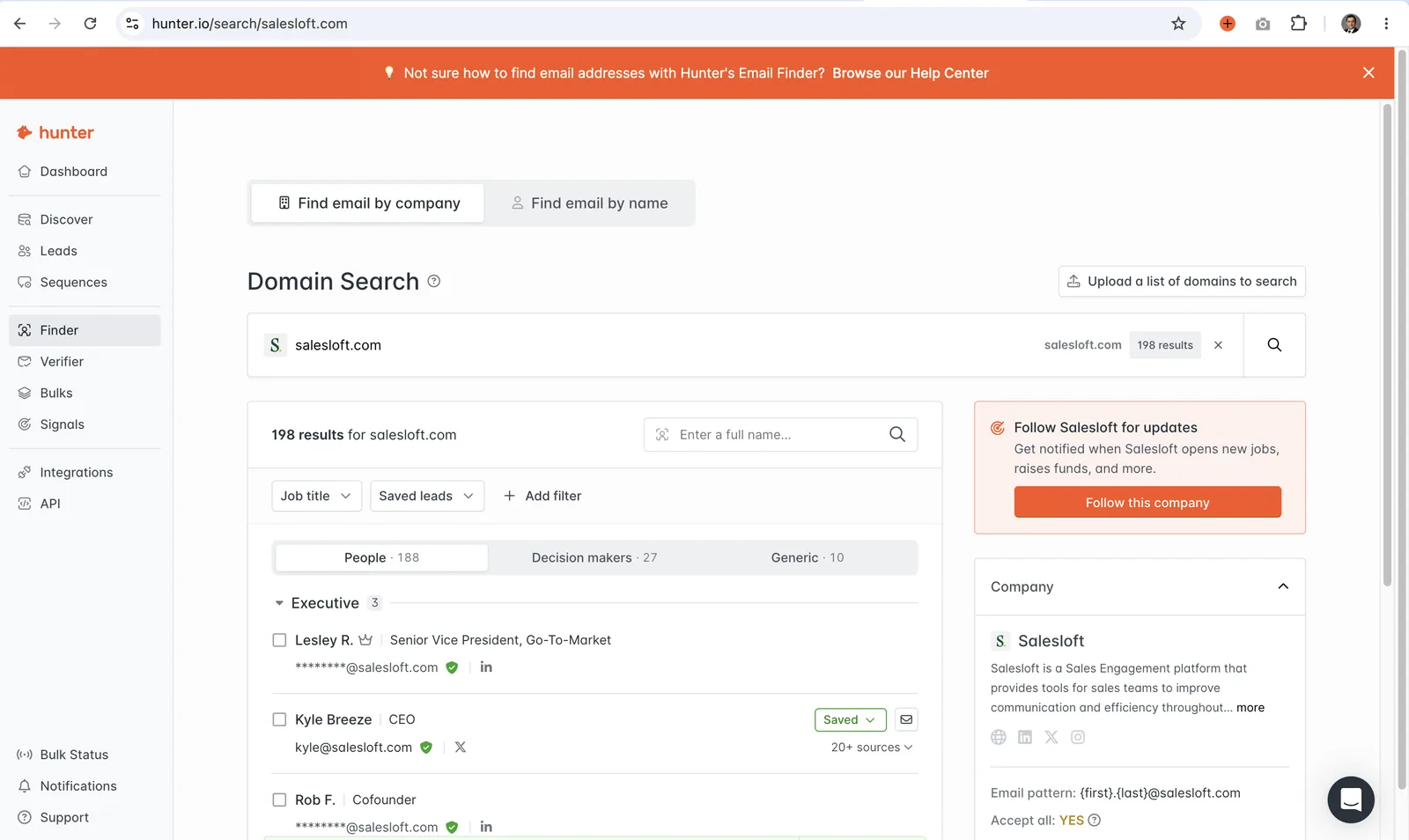
Hunter Domain Search on salesloft.com returning 198 email addresses with 27 decision makers
Domain Search on Salesloft: 198 emails found, 27 decision-makers surfaced, grouped by department.
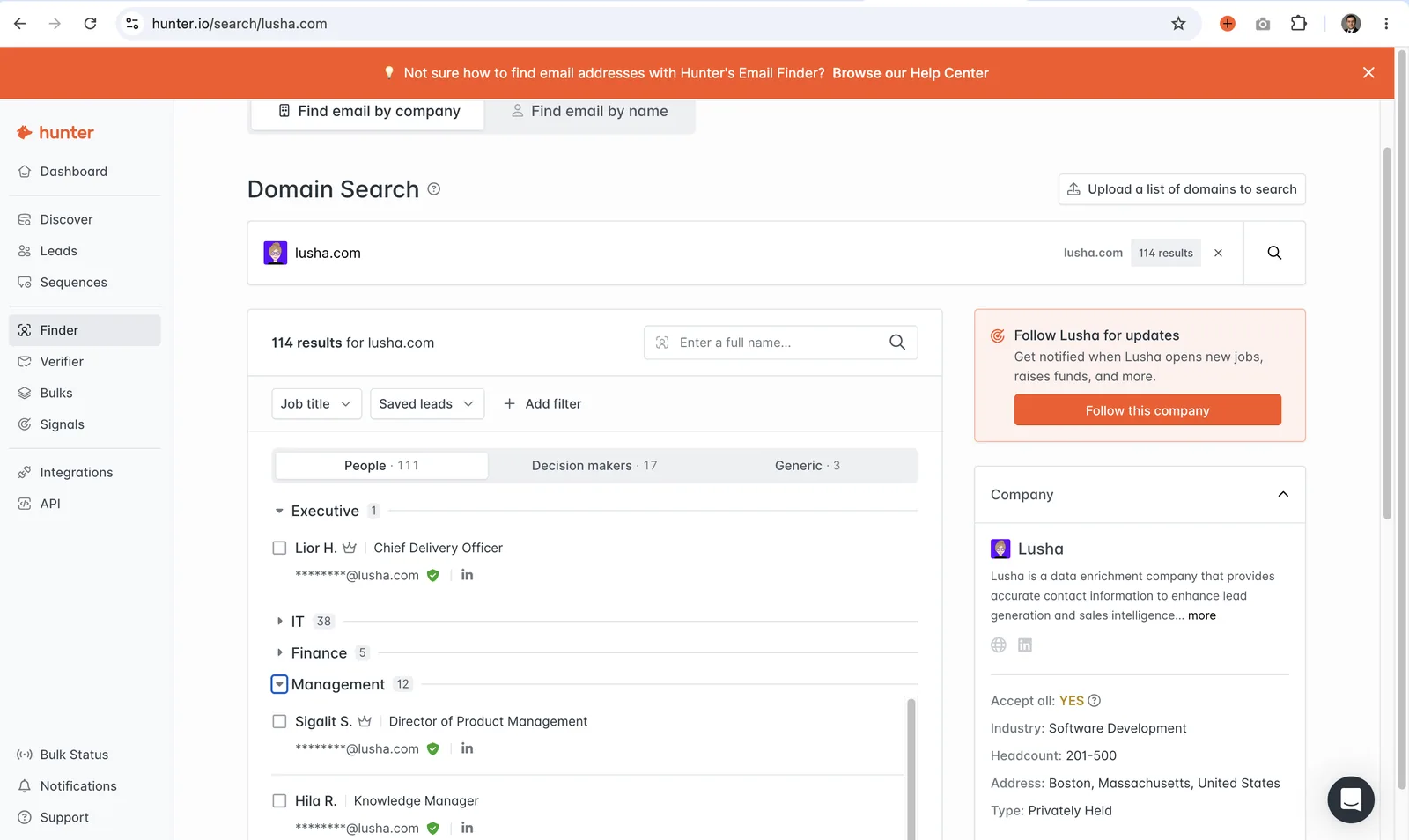
Hunter Domain Search on lusha.com returning 114 results by role
Domain Search on Lusha: 114 emails, 17 decision-makers, ready to filter by role.
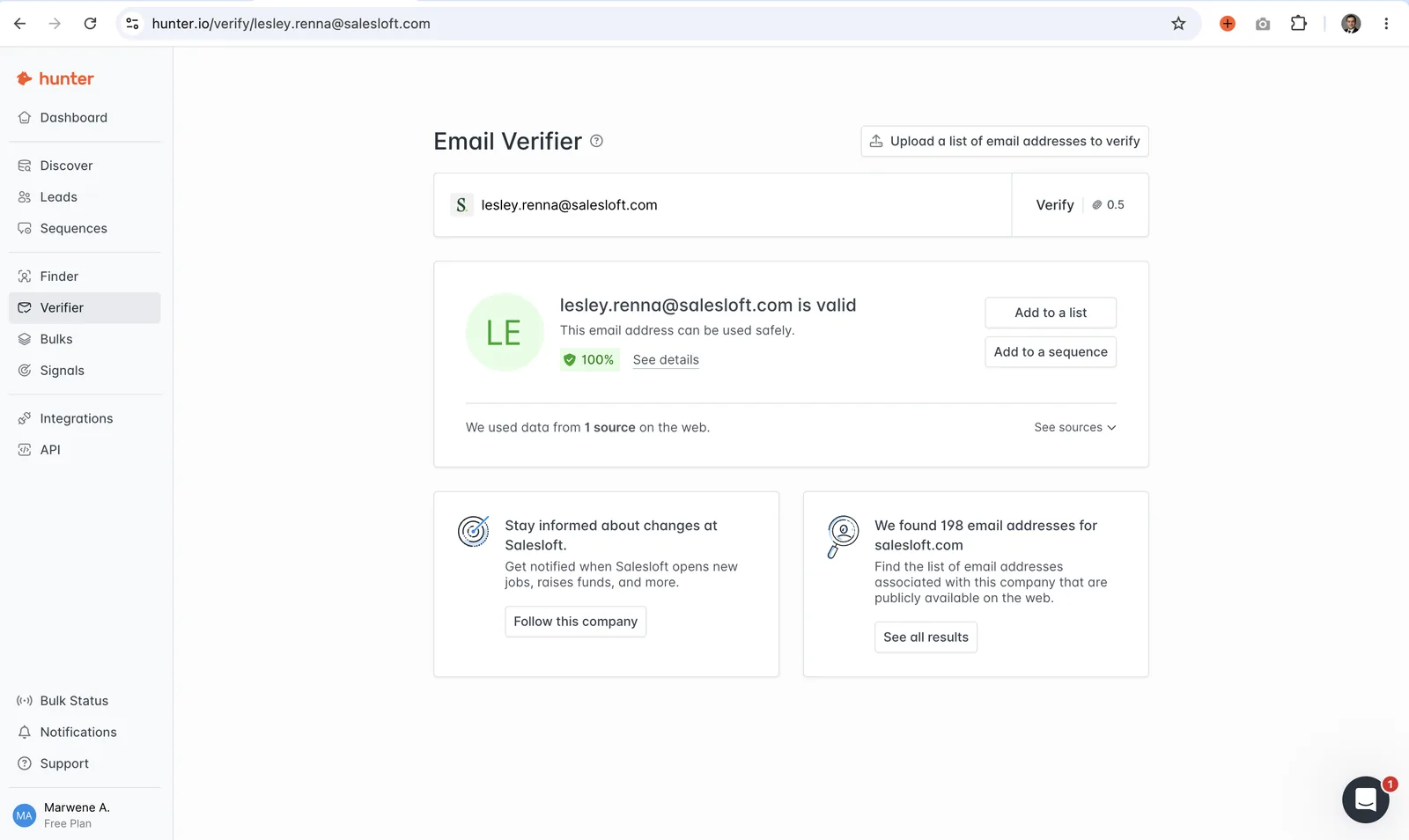
Hunter Email Verifier confirming kyle at salesloft.com is valid with 100% confidence, in green
Verifier says green: address is deliverable, safe to send.
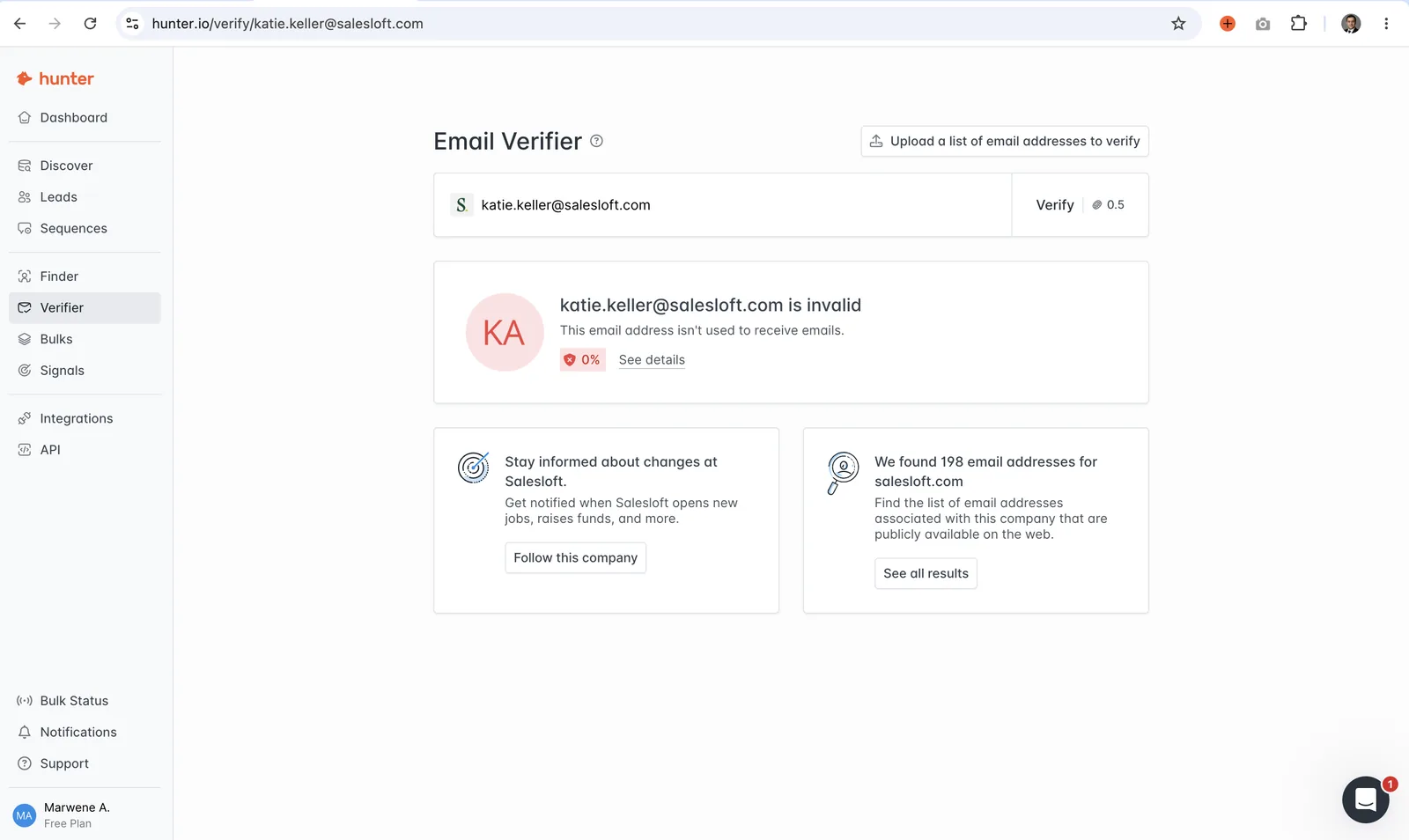
Hunter Email Verifier flagging katie.keller at salesloft.com as invalid, 0%, in red
Verifier says red: mailbox not used. Drop it before send.

The 18-lead sample was built with exactly this two-step flow. If you want to run the same workflow on your ICP, Hunter's free tier covers it end-to-end.

Try Hunter free →

The tools this sample was built with

Two tools do 90% of the work: a finder and a verifier. Both offer a real free tier so you can reproduce this workflow today.

Free tierChrome extension25 searches/month

Hunter (the sample was built with this)

Hunter's Domain Search is what pulled the 18 decision-makers on the sample. You give it a company domain, it returns named contacts with roles and confidence scores. The Verifier is bundled in the same account, so finding and verifying happens in one place. Free plan gives you 25 searches per month with the same Domain Search and Verifier features. Enough to build a small starter list before you decide to pay for volume.

Try Hunter free →

Free tierChrome extension50 credits/month

Snov.io (alternative finder + light sender)

Snov's free tier bundles finder, verifier, and a light cold-email sender in the same 50 credits per month. If you want to test the whole outreach flow end-to-end on a free plan, Snov is the shortest path. Slightly less accurate than Hunter on international domains but broader coverage on standard B2B targets and the Chrome extension on LinkedIn is strong.

Try Snov free →

Both tools were tested hands-on for our Hunter vs Snov review. We flag where each one wins so you don't pick the wrong one for your workflow.

Companion downloads

Two more PDFs sit alongside the sample list. Same source, same voice, all free.

PDFTemplateUniversal tracker

The Inbound Lead Tracker Template

A color-coded tracker for any inbound flow. Six statuses (New, Followed up, Closed - Won, Closed - Lost, No response) plus pipeline summary and win rate. The example is a Facebook Marketplace flow so the pattern is visible, but the structure works for cold email replies, DM prospects, and referral leads with no changes.

Download the tracker →

PDFMethodologyReproducible

The Lead Generation Methodology (Full Version)

The step-by-step process behind the sample list. Six steps from ICP lock to reporting, the tools used at each step, and what the deliverable looks like. Reproducible if you use the same stack.

Download the methodology →

Common questions

Is this a real lead list or a mock example?

Real list. The 18 contacts were sourced through Hunter's Domain Search on real company domains, and the roles are what those companies publicly list. Emails are masked in the public PDF so the individuals aren't exposed, but the structure, verification status, and role coverage is exactly what a full delivery looks like.

Why is the email column masked?

Publishing verified emails on a public page would violate the reasonable expectation those individuals have that their address stays inside a professional context. The mask keeps the sample useful (you see the shape of the delivery) without turning it into a scrape target. A full paid delivery hands over the unmasked, verified addresses directly.

Can I reproduce this list myself?

Yes. Follow the six-step methodology in the PDF using Hunter (finder + verifier) or Snov (finder + verifier + light sender). The 18-contact sample sits within Hunter's free 25-searches-per-month tier, so you can rebuild something equivalent for a small ICP without paying.

What does "catch-all" flagged actually mean?

A catch-all mail server accepts every address at a domain, whether the mailbox exists or not. Hunter can confirm the domain accepts mail, but it can't confirm the specific mailbox is real without an SMTP probe (which many domains block). We flag these amber so you can decide whether to run a second verification pass or accept the risk before sending.

Which is better for building lists like this: Hunter or Snov?

Hunter is the sharper focused finder for operators with a paid sender already in place. Snov is the smarter starter for solos and freelancers who want find + verify + a light cold-email sender in one freemium plan. Full head-to-head in our Hunter vs Snov review.

Do you offer paid lead research?

Yes, on a small-batch basis. Reach out at hello@emailtoolshub.com with your ICP, target volume, and any constraints. Free sample sent before any commitment so you can check the quality on your own domain space first.

Want the operator's playbook too?

19 pages on cold email deliverability, 50 subject lines, 12 templates. Free PDF, delivered to your inbox. Complements the lead list well because a good list without a working sequence is a wasted list.

Get the Playbook →